


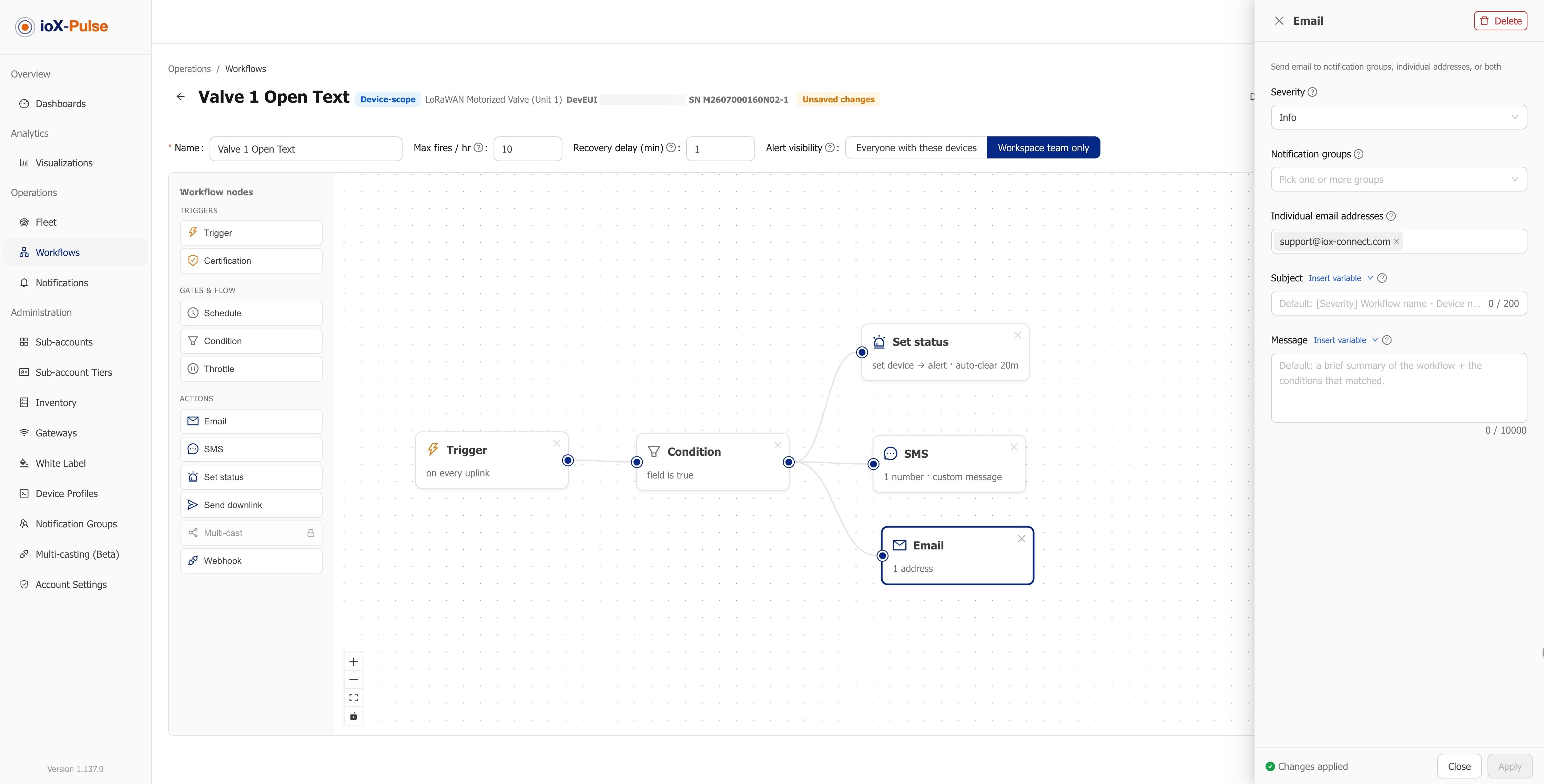
An IoT sensor alert is a rule that watches a reading, fires when the reading crosses a limit or a device goes quiet, and tells a named person by text, email or in the app. The hard part is not firing it; it is firing it once, to the right person, and stopping when the problem is fixed. This explainer walks through how alerting works in ioX-Pulse, and what to decide before you turn a rule on.
The five parts of an alert rule
Every alert in ioX-Pulse is a workflow with the same parts, whether it watches one freezer or a fleet of gateways.
1. Scope: what the rule watches
A workflow can watch one device, every device that shares a device profile, or a gateway. Profile-scope rules are the workhorse: write "temperature above 8 °C (46.4 °F) for 10 minutes" once for the cooler sensor profile and every cooler sensor in the workspace follows it. New sensors inherit the rule the day they join.
2. Trigger and condition
The trigger is the event that evaluates the rule: a new reading arrives, or a periodic check runs. The condition is the test: above or below a threshold, equal to a state such as door open, or silent for longer than the device's offline threshold. The periodic check is what makes silence an alertable condition; a sensor that stops reporting never sends the reading that would trip a threshold.
3. Delay before it counts
A door opened for 30 seconds should not page anyone. A delay says the condition must hold for a set time before the alarm opens. The same idea works on the way back: a recovery delay keeps the alarm open until the reading has been back in range long enough to trust.
4. Who is told, and how
Actions send email, text message or an in-app notification, to the people you choose. Text messages draw on a prepaid credit pool, with a live estimate of credits per message in the builder and a warning when the balance runs low, so a text never fails silently. Since the October 2026 release, members are only notified about equipment they can open: a customer's team sees alerts for the customer's own devices, and your workspace team can be kept to internal alerts.
5. Repeat and ceiling
An alarm that stays open should remind, not flood. A repeat window sets how often the reminder goes out while the condition holds, and a per-device ceiling caps how many times any one device can fire in an hour. Both exist because the alternative, 400 texts from one sensor during a long excursion, trains people to ignore the phone.
An alarm is an episode, not a message
ioX-Pulse treats each alarm as an episode with a start, any repeats, and a recovery. That is what lets you see "cooler 3 was out of range from 02:14 to 03:40, acknowledged by Sam at 02:20" instead of a pile of separate notifications. Episodes can be acknowledged one at a time or in bulk from the Fleet view, and the history of every run is kept with the workflow.
The alert most sites forget
The most common reason a site goes dark is not a sensor; it is the gateway. Every ioX-Pulse account has a gateway offline workflow available by default: a periodic check, a "gateway silent" condition, and email or text actions. Turn it on before anything else. A silent gateway with no alert looks exactly like a site where everything is fine.
Templates ship off
Device profiles in ioX-Pulse come with workflow templates for the obvious conditions, and they ship disabled. That is deliberate: a template that fires on day one, with a default threshold and nobody assigned, is noise. Review the threshold, the delay and the recipients, then enable it. Since the October release a customer's workspace admin can also adjust a profile workflow, save it as their own version, or revert it, without touching the partner's original.
Six decisions to make before you enable a rule
- What is the actual limit? Use the number from the process, the regulation or the equipment manual, not a round number. Write the unit in both scales where your team mixes them.
- How long must it hold? Match the delay to how the condition behaves: seconds for a leak, minutes for a cooler door, longer for a slow drift.
- Who is on the hook at 2 a.m.? Email reaches a desk. A text reaches a person. Decide per rule.
- What does silence mean here? Set the offline threshold to a little more than the device's reporting interval, and alert on it.
- How often should it remind? Long enough that the second message is useful, short enough that nobody forgets the first.
- Who may see it? Customer team, workspace team, or both.
Pro tip: run a new rule for a week with only yourself as the recipient. Count the alerts. If you would not want to receive them at that rate, tune the delay and repeat window before adding the people who actually respond.
Where this fits
Alerts are one piece of remote IoT monitoring software for wireless sensors: readings arrive through device profiles, people see them on dashboards, and the rules on this page decide who hears about trouble. The full capability is described on IoT alerts and workflows. If you are choosing a platform, the buyer's guide covers what to ask about alerting before you commit.
Frequently asked questions
How does an IoT sensor alert work?
A rule watches a sensor's readings. When a reading crosses a limit, matches a state such as door open, or the device stays silent past its offline threshold, the rule opens an alarm and notifies the people assigned to it by email, text message or in-app notification. The alarm stays open until the condition clears and a recovery delay has passed.
Can I get a text message instead of an email?
Yes. ioX-Pulse workflows can send text messages, email and in-app notifications, in any combination per rule. Text messages use prepaid credits with a live estimate in the builder and a low-balance warning.
How do I stop getting the same alert over and over?
Set a repeat window so an open alarm reminds at a sensible interval rather than on every reading, and a per-device hourly ceiling as a backstop. A delay before the alarm opens, and a recovery delay before it closes, remove the on-off flapping that produces most duplicate alerts.
Will I know if a sensor or gateway stops reporting?
Only if a rule watches for silence. ioX-Pulse evaluates device offline thresholds on a periodic check, and every account has a gateway offline workflow available by default. Enable it; a silent gateway is the most common reason a whole site stops reporting.
Can my customers manage their own alert rules?
Partners can allow it. Since the October 2026 release a customer's workspace admin can change a profile workflow, save it as their own version, remove it or revert to the partner's original, and alert visibility can be limited to the customer's own devices.
Ready to set up alerting on your own sensors? Start your free trial or talk to an IoT specialist.
ioX-Connect
ioX-Connect is a comprehensive IoT Management Platform designed to streamline the monitoring of facilities and equipment.