Every device you ship, in one place

LoRaWAN Device Management

Pulse-Leak-Plus-Valve-1
Every device you ship, in one place

Register, Assign, and Monitor LoRaWAN Devices

LoRaWAN device management is the work of registering devices, provisioning them onto the network, assigning them to the right customer or site, and keeping track of their health once they are in the field. ioX-Pulse handles all four from one place, for devices from any manufacturer.

Most of that work happens once per device, in the first ten minutes of its life, and then never again. The rest of the time what you need is a list that tells you which units have gone quiet, which are running low on battery, and which are reporting from a weak signal position before that turns into a support call.

Key specifications:

  • Import 1,000 devices from one spreadsheet, with every row checked before anything commits
  • Let customers bring their own devices online using two numbers printed on the label
  • See battery, signal, and last-heard-from on every device, with nothing to configure per device
  • Works with sensors and gateways from any LoRaWAN hardware manufacturer
  • Devices sitting in inventory cost you nothing until they are assigned
  • Know a device has gone quiet within 30 minutes, or set your own threshold
Our Customers

Trusted by customers across multiple industries

Tomra Full logo
ProFrac Logo
FTSI-logo
Consulmet logo
pacific_northwest_national_laboratory
Axium Logo
Urban Property Management_Logo
NetLink-logo-final
Cosway
USWS_BIG
Filtrine
Colt Energy
Northern Michigan University_Logo
WLS Lighting Logo
Bell Lumber Logo

The part nobody quotes for

Fleets Get Harder to Watch, Not Harder to Deploy

Registering one device takes a minute. Registering four hundred takes a week, unless you can do it in a single file. But deployment is the part everyone plans for. The part that catches people out is what happens next, because the job changes completely. You stop deploying and you start noticing.

Noticing the unit that has not reported since Thursday. Noticing the three running at eight percent battery. Noticing the site where every device sits at the edge of coverage, so one bad week of weather takes them all offline at once. Most platforms hand you a device list. Fewer hand you a device list that tells you which forty of your four hundred devices need you this week.
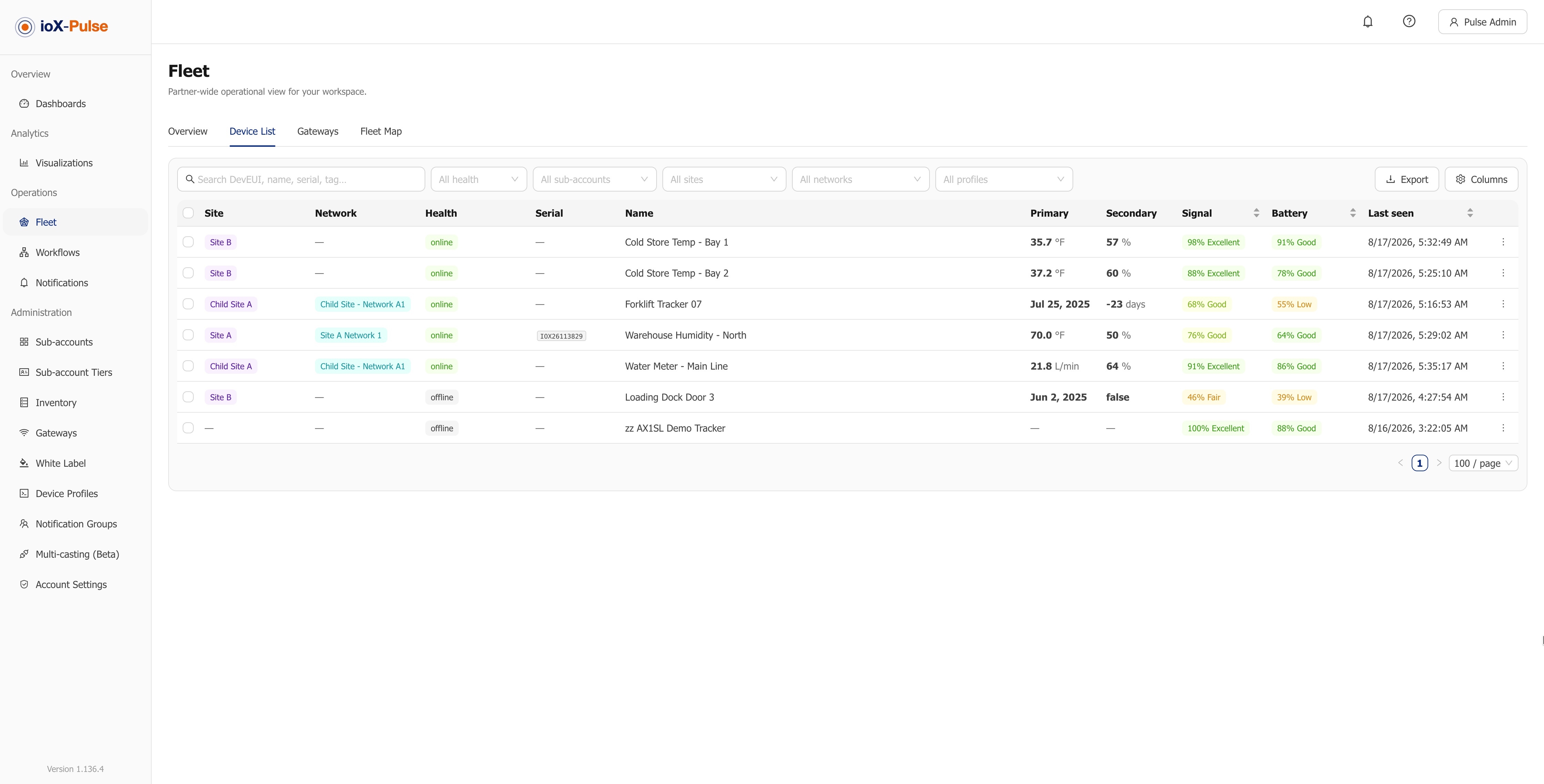
The ioX-Pulse fleet device list showing status, battery and last-seen columns across a large device fleet.

Status, battery and last seen are columns you can sort and filter the whole fleet by.
What changes when it is done properly

Four Things You Stop Doing by Hand

Device management is mostly repetition, and repetition is what software should absorb. These are the four places ioX-Pulse takes the work off you.

Deploy in bulk, not one at a time

Import up to 1,000 devices from a single spreadsheet. Every row is validated and shown to you before anything commits, so a typo in row 300 does not cost you the batch.

Hand the setup to your customer

Mark a device claimable and ship it. Your customer brings it online with the two numbers printed on its label. No call, no screen share, no engineer on site.

See the whole fleet at a glance

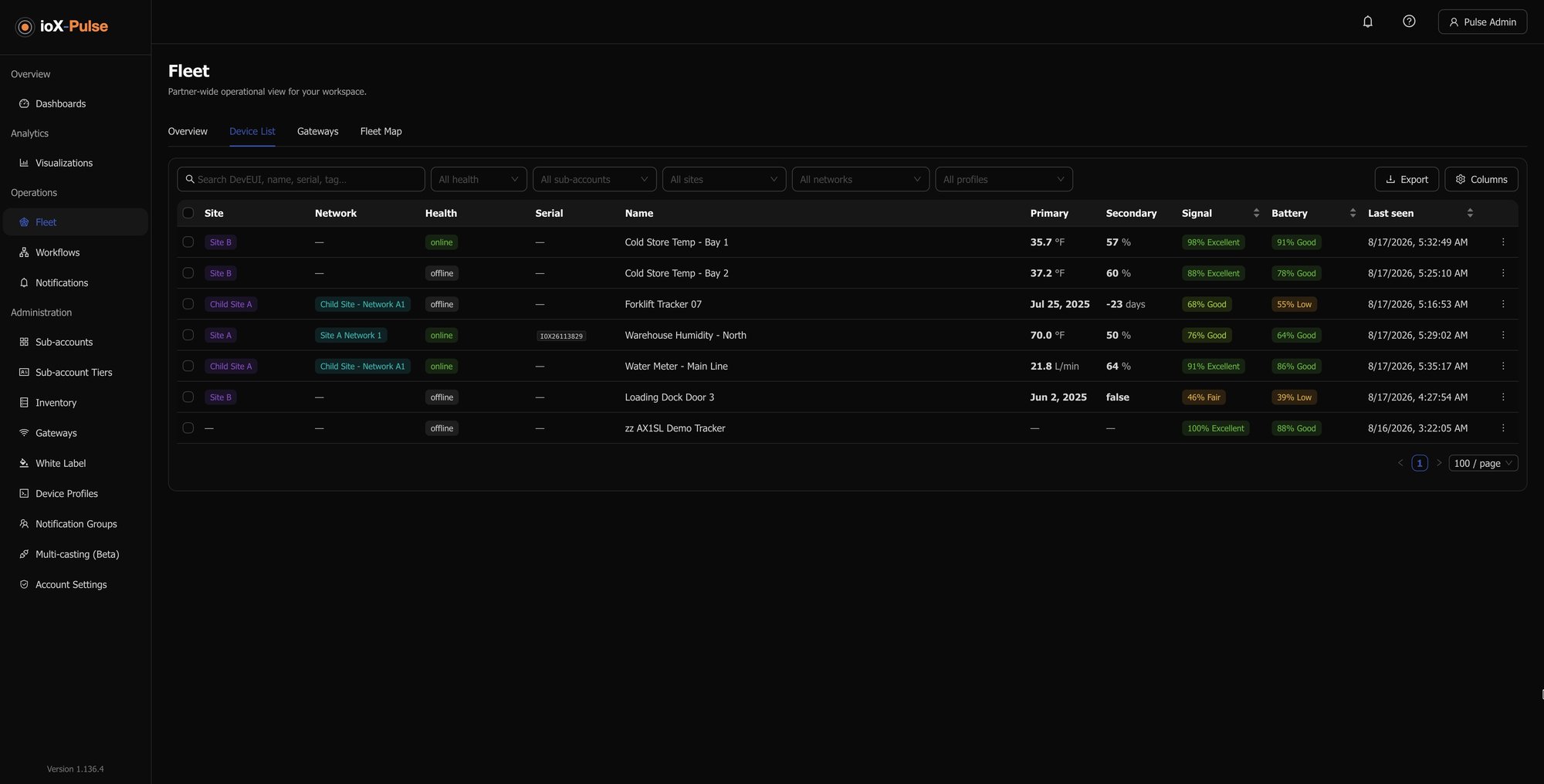
Battery, signal quality, and last-heard-from on every device, sorted so the ones that need attention rise to the top. Nothing to configure device by device.

Pay only for what is live

Devices staged in inventory do not consume a license. Register a shipment the day it lands and start paying when it reaches a customer, not before.

The honest version

What This Looks Like Without a Platform

Most fleets start on a spreadsheet and a network server console, and that works until it does not. Here is the same six jobs, done both ways.

The job On a spreadsheet and a console With ioX-Pulse
Bringing 400 devices online Four hundred manual entries, or a script and an engineer who knows the API One spreadsheet, validated before anything commits
Setting up a new customer An engineer on a call or on site for the install The customer enters two numbers from the device label
Finding a failed sensor When the customer calls to say the data stopped Flagged within 30 minutes, with an alert to the right person
Knowing which sites are fragile Reading raw radio figures, or guesswork Sort the fleet by one score between 0 and 100
Hardware waiting in storage Licensed from the day you register it Free until it is assigned to a customer
Moving a device to a new customer Manual cleanup, and alerts that keep firing for the old account Unassign and reassign; alarms clear with the reason recorded

Four ways in, depending on your day

How a Device Gets Online

Which route you take depends on how many devices you are handling and who is physically holding them. All four end in the same place: a device provisioned on the network, assigned to the right customer, showing up on a dashboard.

1

Add one device

Type in the two identifiers from the device label, pick the profile that matches the model, and name it. Under a minute for a device you are holding.

2

Import a batch

Download the template, paste in your device list, upload. Up to 1,000 devices at a time. Rows with problems are flagged and skipped rather than failing the whole file.

3

Assign it to a customer

Assignment is what puts a device live on the network. Pick the customer and ioX-Pulse handles provisioning in the background, usually within a minute. Do it in bulk when a customer comes online.

4

Let the customer claim it

Ship pre-registered hardware and let your customer finish the job. They enter the two numbers on the label and the device provisions itself into their account.

Every route ends the same way: provisioned on the network, assigned to a customer, live on a dashboard.

LoRaWAN device management | LoRaWAN device management software
The list that tells you where to go today

Know Which Devices Need You This Week

Once devices are in the field, one screen matters more than the rest: the list that tells you what changed. It sorts live devices first, updates as readings arrive, and filters down to whatever you are chasing, whether that is one customer, one site, or every device that has gone quiet.

Every device carries a Signal Quality score between 0 and 100, which combines the two radio measurements into one number anyone can read. Sort by it and your weakest-connected devices rise to the top. That is your site visit list, and you get it without configuring anything.

What the fleet list tells you at a glance

  • Which devices have gone quiet, based on a 30-minute threshold you can change per device
  • Which have an alert nobody has acknowledged yet
  • Which are transmitting too often, usually a misconfiguration worth catching early
  • Which are sending data that does not match their profile, usually the wrong profile assigned
  • Which have a compliance document expiring in the next 30 days
  • Which are sitting on a weak signal, before that becomes a support call
IoT Platform Device Profiles & Payload Decoders | ioX-Pulse
No lock-in to our hardware

Works With the Devices You Already Own

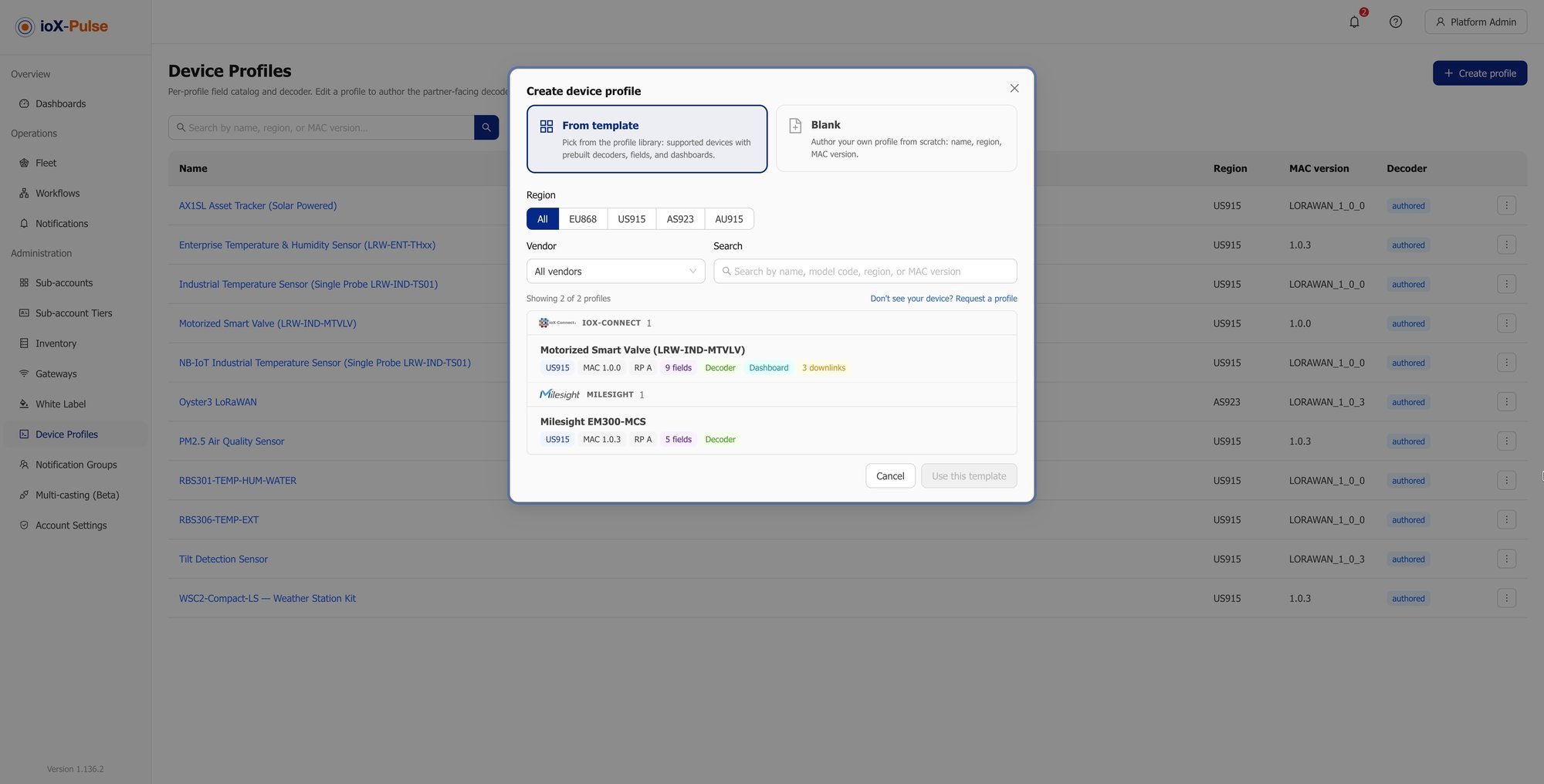
You do not have to replace a working deployment to get better management of it. ioX-Pulse takes devices from any manufacturer: sensors from the major vendors are already in the profile library with tested decoders, and anything missing can be added. All you need from the manufacturer is the two identifiers every LoRaWAN device ships with.

Five regional frequency plans are supported, and LoRaWAN is not the only way in. Cellular NB-IoT and LTE-M devices register alongside it, and Blues Notecard devices connect through your own Notehub project.

Answers to the questions we get most

Common Questions About LoRaWAN Device Management

These come up in nearly every evaluation, usually in this order. If yours is not here, a specialist can walk through your deployment with you.

LoRaWAN device management is the work of registering devices, provisioning them onto the network, assigning them to the right customer or site, and monitoring their condition in the field. In practice it covers three things: getting devices online quickly, knowing which ones have stopped working, and keeping track of who owns what.

Up to 1,000 in a single spreadsheet import. Every row is validated and shown to you before anything commits, and rows with problems are skipped rather than failing the whole file, so one bad entry does not cost you the batch.

Yes. Mark a device as claimable before you ship it, and your customer brings it online by entering the two identifiers printed on the label. Both have to match, so possession of the physical device is required. It removes the engineer from the install without opening anything else in your account.


Yes. Sensors from the major manufacturers are already in the profile library with tested decoders, and profiles can be created for anything that is not. Registration only needs the identifiers the manufacturer supplies with the device.


It is flagged as offline once nothing has arrived within its expected window, 30 minutes by default and adjustable per device. That shows on the fleet list, on the device page, and on any dashboard widget bound to it, and an alert rule can email or text you the moment it happens.


Signal Quality is a single score between 0 and 100 that combines the two radio measurements into one number anyone on your team can read. It works on every device without any setup, and because it is comparable across different hardware, sorting by it gives you a ranked list of the sites most likely to cause problems.


Unassign their devices and they return to your inventory, ready to redeploy. History is preserved, active alarms clear automatically with the reason recorded, and any rules that belonged to that account are switched off so nothing keeps firing for a customer who is no longer there.


No. Devices staged in inventory and devices retired to archive do not consume a license. You pay for devices that are assigned and live, which means you can register a shipment the day it arrives rather than the day it goes out.


Have more questions about

Our Products and Services

We're here to help, do not hesitate to reach out to us by scheduling a quick call with one of our consultants.

Contact Us

Our customer service representative helps you to understand what we offer for your business goals.