Connect a LoRaWAN Gateway to ioX-Bridge
Two Ways In, Band the Ports for Both
To connect a LoRaWAN gateway to a network server you need three things: somewhere to send the traffic, credentials the server will accept, and a region that matches the radio. ioX-Bridge takes gateways over Basics Station with a TLS client certificate, or over the ordinary Semtech UDP packet forwarder. Both are on this page, with the actual addresses.
One thing before anything else. The region you select when you register the gateway has to match the frequency plan the gateway is running. When it does not, packets are dropped without an error anywhere: the gateway looks healthy, the console looks healthy, and nothing arrives. It is the most common reason a correctly wired gateway never comes up, and it is the first thing to check rather than the last.
- US915, EU868 and AU915, each with its own UDP port and its own Basics Station endpoint
- Basics Station over a secure WebSocket, with a client certificate generated for that specific gateway
- The Semtech UDP packet forwarder, because a great deal of deployed hardware runs it
- No proprietary gateway required, and no vendor preferred
- A healthy gateway updates its last seen time roughly every thirty seconds, so you know within a minute
Three fields and a warning
Register the Gateway First
Nothing connects until the network server knows the gateway exists. Registering it takes three fields, and the console then shows you exactly where to point it.
Traffic only flows once the middle box is registered and pointed at the right regional endpoint.
| Field | What goes in it |
|---|---|
| Name | Something you will recognize on a list at two in the morning. A location works better than a model number. |
| Gateway ID | The gateway's EUI64, sixteen characters, usually printed on the label or shown in its own web interface. |
| Gateway region | US915, EU868 or AU915, matching the frequency plan the gateway is actually running. |
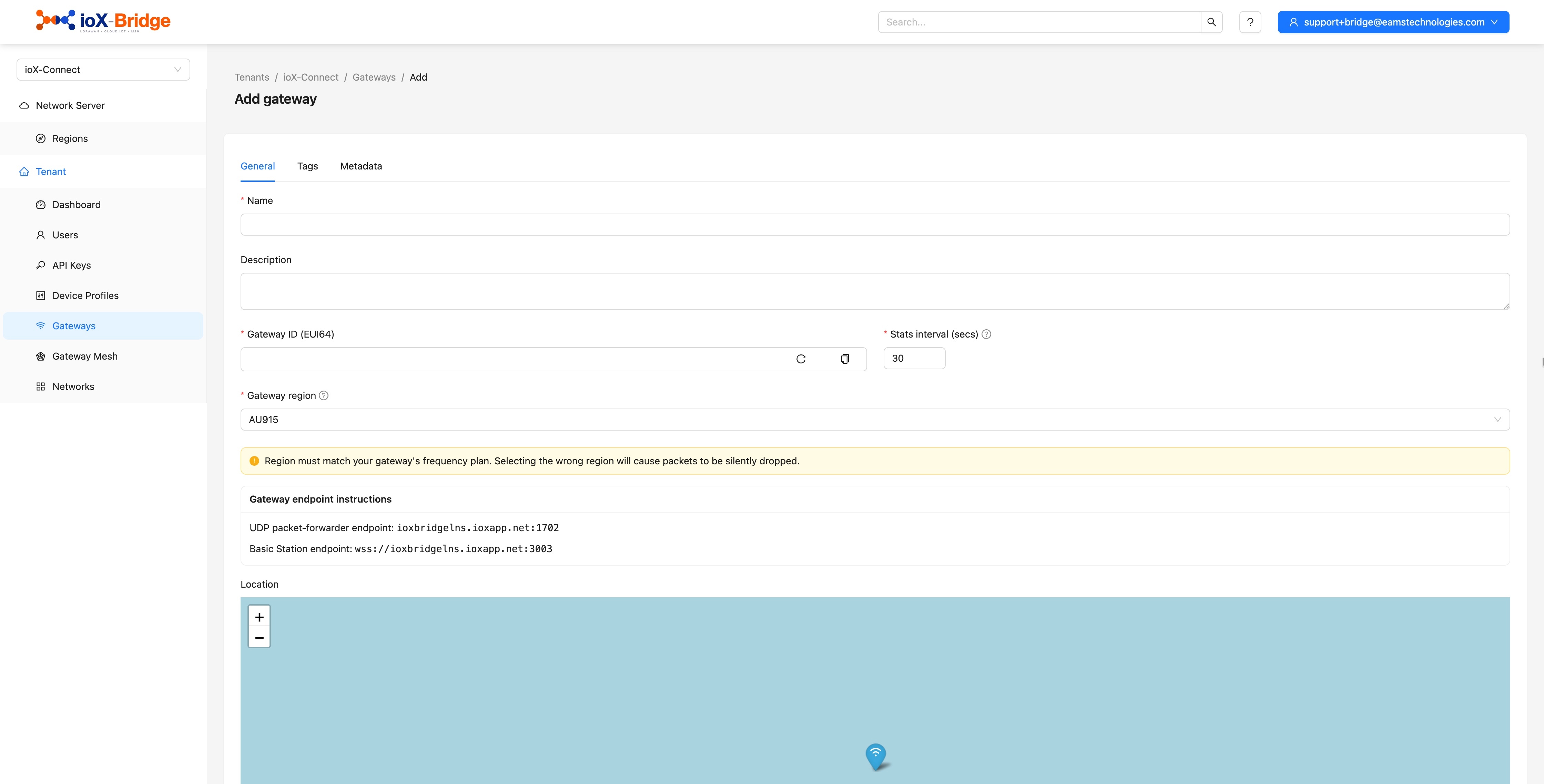
Once it is registered the gateway shows as never seen until it makes contact, and the console displays the endpoint details for the region you chose. The same details stay available afterward on the gateway's own dashboard, so you do not have to write them down.
Selecting the wrong region does not produce an error. It produces silence. Packets are dropped without a message, at either end, which is why a gateway that is wired correctly and configured correctly can still show nothing at all.
Trusted by teams monitoring critical infrastructure

The addresses, in full
Where to Point It
Each region has its own endpoints. Use the row for the region you registered the gateway under, and nothing else on this page will matter if those two do not match.
| Region | UDP packet forwarder | Basics Station |
|---|---|---|
| US915 (Americas) | ioxbridgelns.ioxapp.net, port 1700 | wss://ioxbridgelns.ioxapp.net:3001 |
| EU868 (Europe) | ioxbridgelns.ioxapp.net, port 1701 | wss://ioxbridgelns.ioxapp.net:3002 |
| AU915 (Australia) | ioxbridgelns.ioxapp.net, port 1702 | wss://ioxbridgelns.ioxapp.net:3003 |
For the packet forwarder, set the server address to ioxbridgelns.ioxapp.net and set both the uplink port and the downlink port to your region's number. Setting only one of them is a common slip and produces a gateway that appears to work until you try to send something back to a device.
Your firewall needs to allow outbound UDP on that port for the packet forwarder, or outbound TLS for Basics Station. Neither needs anything inbound.
Bring a Gateway Online
Try It With Your Own Payload
The fastest way to know whether this works for your hardware is to run one of your own uplinks through ioX-Bridge
Send Us Your Gateway List
Tell us the models and the regions and we will tell you what connecting them looks like, including the ones that will be awkward.
Talk to Us About ioX-BridgeOne is better, one is everywhere
Basics Station or the Packet Forwarder
Both are supported and both work. They are not equivalent, and it is worth knowing which one you are running before you deploy a hundred of them.
| Semtech UDP packet forwarder | Basics Station | |
|---|---|---|
| Transport | UDP, unencrypted | Secure WebSocket over TLS |
| Who the server knows it is | The gateway EUI, and whatever else arrives on that port | A client certificate issued for that specific gateway |
| Configuration | A server address and two port numbers | A URI and three files on the gateway |
| Availability | Runs on almost everything deployed in the last decade | Newer firmware, and not every gateway has it |
| Certificate upkeep | None | Regenerate before the certificate expires |
| Use it when | It is what your hardware runs | Your hardware supports it |
Use Basics Station if your gateway supports it. The packet forwarder is supported because so much hardware runs it, not because it is the better choice, and gateways attempting a plain unencrypted WebSocket connection are refused outright rather than downgraded.
Generated per gateway
How the Basics Station Certificate Works
A Basics Station gateway authenticates with a certificate of its own rather than a shared secret, so one compromised gateway does not put the rest of the fleet at risk. You generate it in the console, per gateway.
| Step | What happens |
|---|---|
| 1 | Open the gateway you registered and go to its TLS certificate tab. |
| 2 | Generate the certificate. It is shown once and never again, so put it somewhere before you close the page. |
| 3 | Install the certificate on the gateway as tc.crt, and the key as tc.key. |
| 4 | Install the public Let's Encrypt ISRG root chain as tc.trust, which is what the gateway uses to verify us. |
| 5 | Set the gateway's LNS URI to the secure WebSocket address for your region, from the table above. |
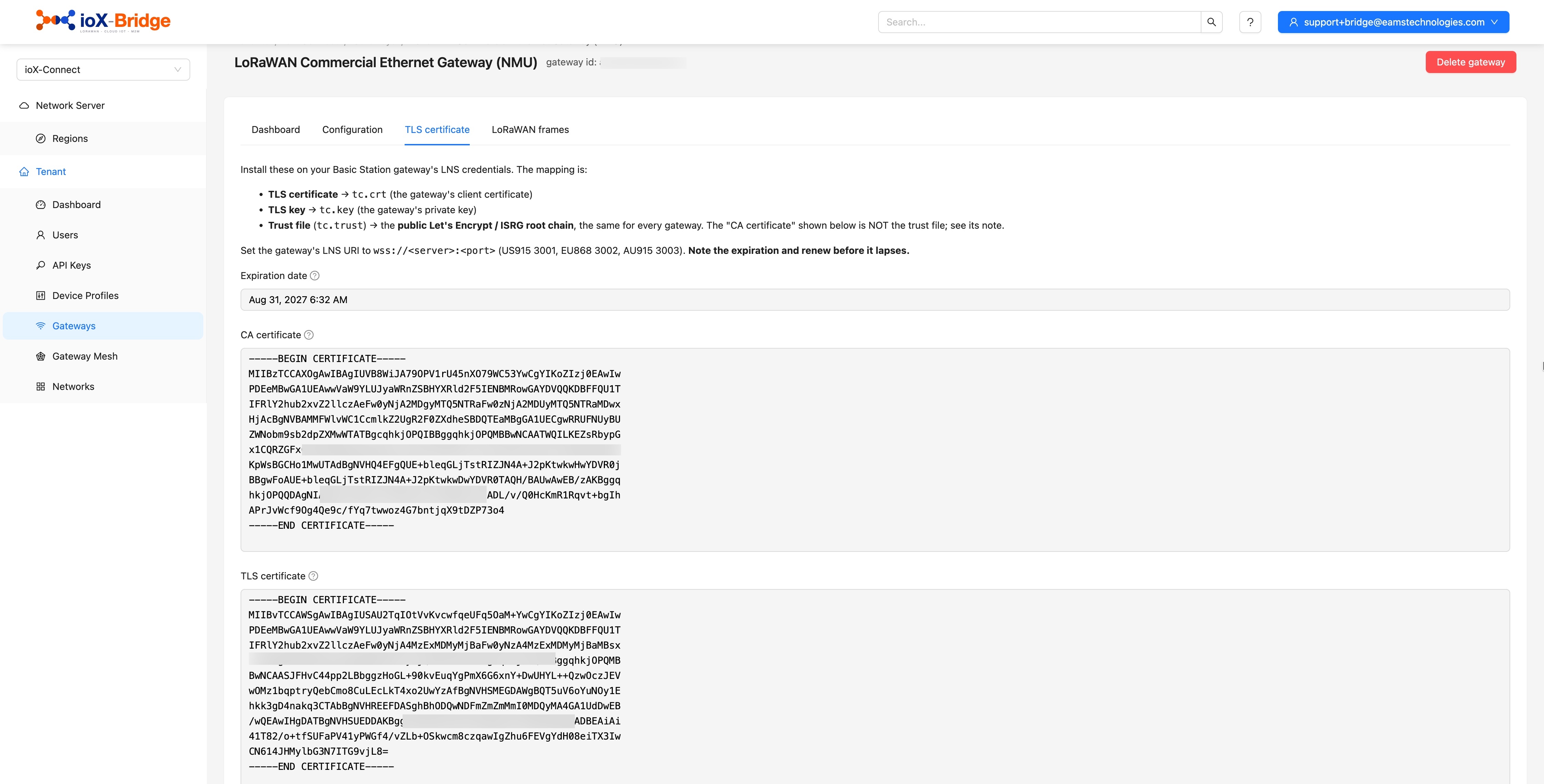
Certificates are valid for one year and do not renew themselves. Note the date somewhere you will see it, because an expired certificate presents exactly like a network fault: a gateway that was fine yesterday, with nothing in the logs to explain it.
Work top down
When It Does Not Come Up
Check these in order and stop at the first one that is wrong. Almost every failure at this stage is one of four things, and none of them require anybody to drive anywhere.
Still says never seen
The address or the port on the gateway does not match the endpoint shown on its dashboard. Compare them character by character rather than from memory; a transposed port number reads as correct at a glance.
Connects, then nothing arrives
The region is wrong. The gateway is talking and the packets are being discarded silently. Re-check the frequency plan the gateway is actually running, not the one it was ordered as.
Basics Station will not establish
Either the certificate files are not where the gateway expects them, or tc.trust does not hold the Let's Encrypt root chain. A gateway attempting to connect over plain unencrypted WebSocket, or with no client certificate at all, is refused.
It was working and stopped
Check the certificate expiry first if it is a Basics Station gateway. After that, whether anything changed on the network path outbound.
Gateway is up but a device is silent
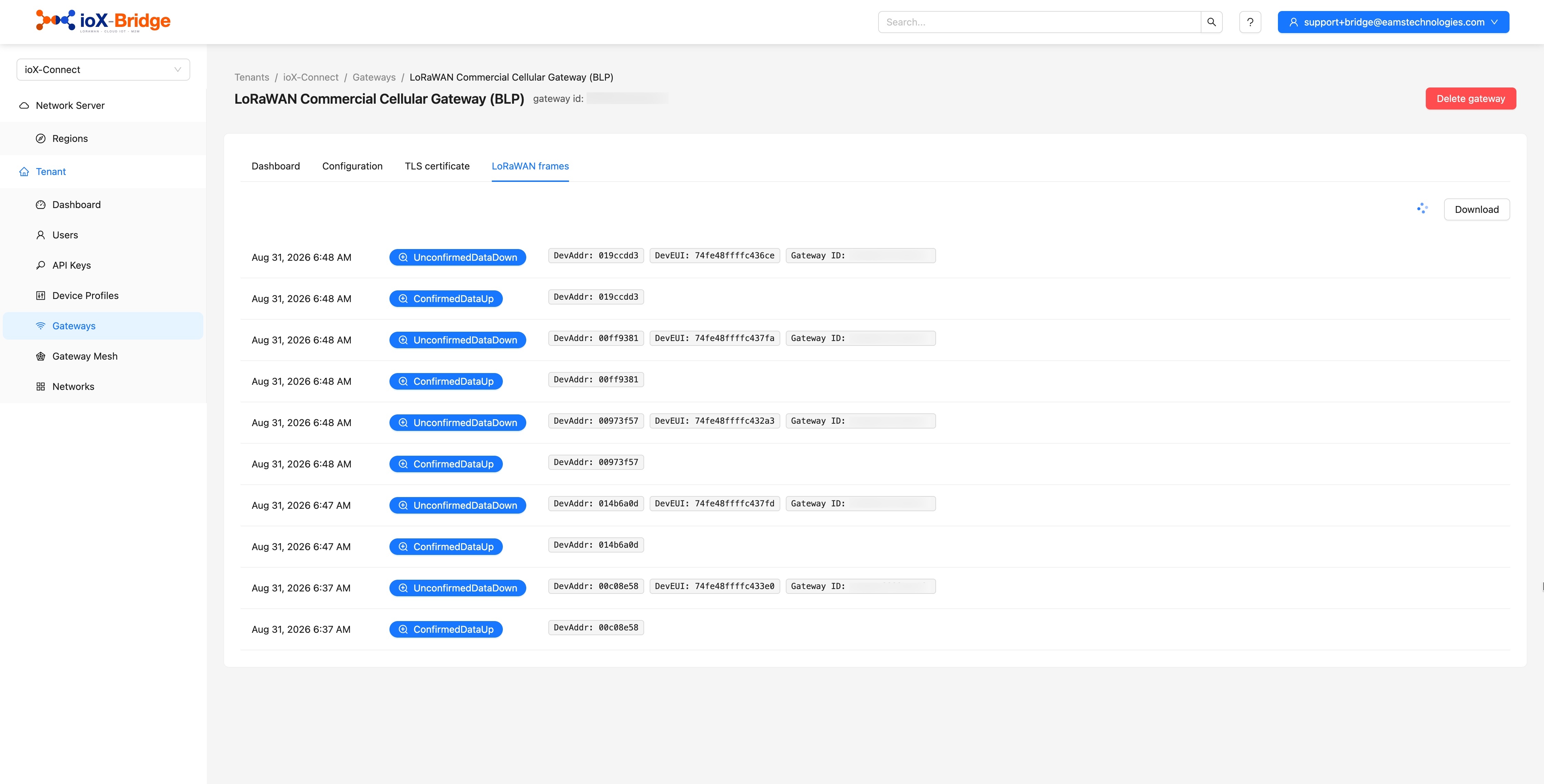
Not a gateway problem. Open the gateway's LoRaWAN frames tab and power-cycle the device: if no join request appears at all, the device is out of coverage or on a different region, which is a device question rather than a connection one.
The quick check
A healthy gateway updates its last seen time roughly every thirty seconds. If that figure is moving, the connection is fine and the problem is further along.
Common Questions About Connecting a LoRaWAN Gateway
If your question is not here, email sales@iox-connect.com and you will get a straight answer
Register the gateway on the network server first, using its EUI and the region matching its frequency plan. The server then gives you an address to point the gateway at. With ioX-Bridge that is either a UDP address and port for the Semtech packet forwarder, or a secure WebSocket URI plus a client certificate for Basics Station. Configure whichever your gateway firmware supports, and it appears in the console within about a minute.
It depends on the region, because each one has its own. On ioX-Bridge the UDP packet forwarder uses port 1700 for US915, 1701 for EU868 and 1702 for AU915, all at ioxbridgelns.ioxapp.net. Basics Station uses a secure WebSocket on ports 3001, 3002 and 3003 for the same three regions. Set both the uplink and downlink port to the same number.
Use Basics Station if your gateway supports it. It runs over TLS with a certificate issued for that specific gateway, so the connection is encrypted and the gateway is authenticated individually rather than trusted because it knew an address. The packet forwarder is unencrypted UDP and is supported because most deployed hardware runs it.
It is the address your gateway sends traffic to, LNS being short for LoRaWAN network server. On a Basics Station gateway it is a setting in the gateway's own configuration, and it takes the secure WebSocket address for your region.
Almost always the address, the port or the region. Compare the address and port configured on the gateway against the endpoint shown on the gateway's dashboard, character by character. Then confirm the region you registered matches the frequency plan the gateway is actually running, because a region mismatch drops packets with no error at either end. Then check the firewall allows outbound UDP, or outbound TLS for Basics Station. Nothing inbound is needed.
No. Any standards-compliant LoRaWAN gateway connects, and no vendor is preferred or required. If it runs the Semtech packet forwarder or Basics Station, which covers essentially everything on the market, it will work.
The gateway stops connecting, and it looks like a network fault rather than a certificate problem. Certificates are valid for a year and do not renew themselves, so generate the replacement before the expiry date rather than after the gateway goes quiet.
Yes, and that is normal. A gateway is shared infrastructure: it forwards traffic from any device in range, and which customer a device belongs to is decided above the radio, not at the gateway.
Bring us the hard one
Ready to Connect?
If you have a gateway that will not come up on something else, tell us what it is. We would rather look at the awkward one first than the easy one.