


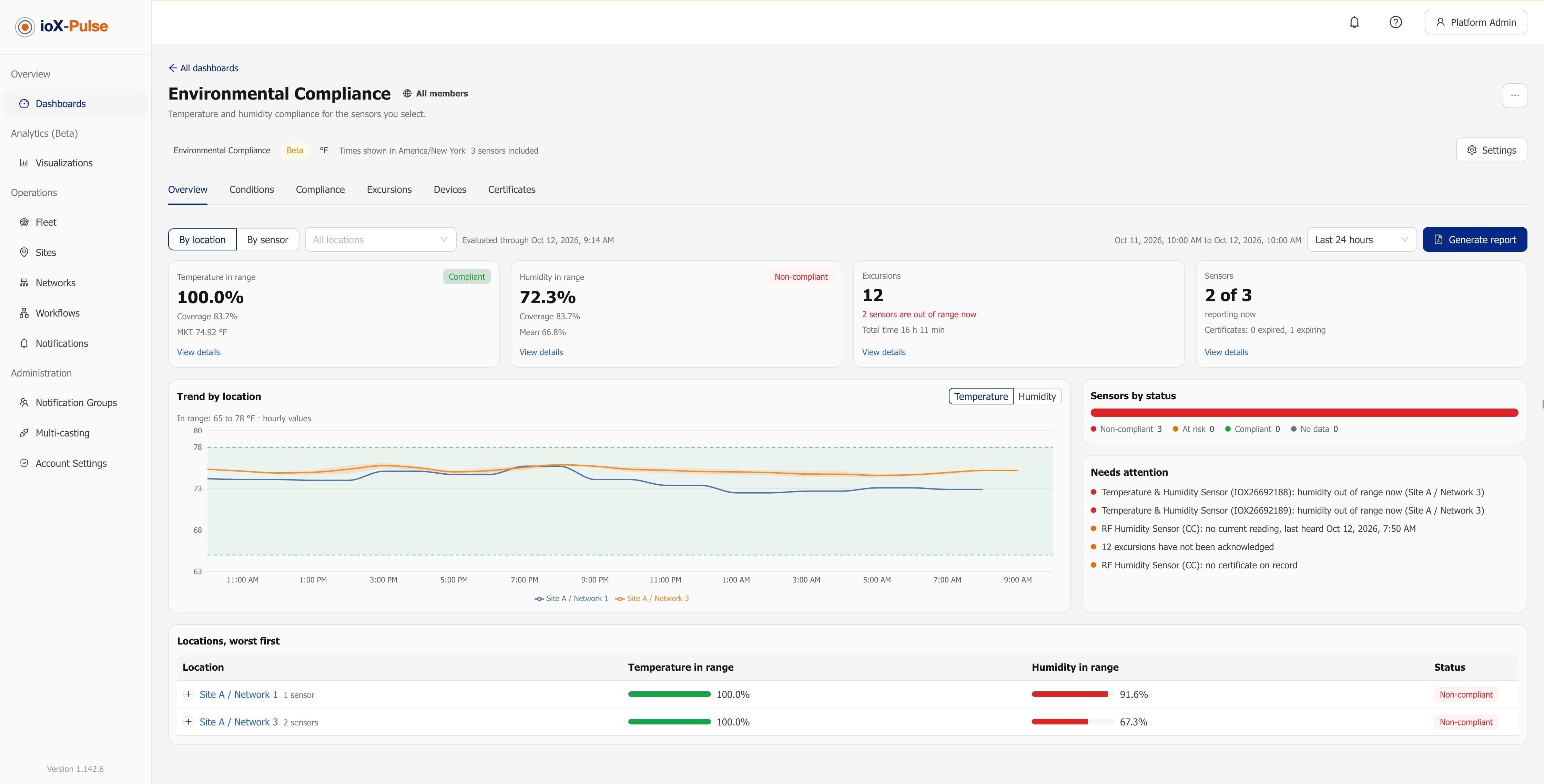
ioX-Pulse 1.142.6 is the October release. It adds the Environmental Compliance dashboard (Beta) for temperature and humidity monitoring, Sign in with Google alongside your password, and a reorganized Device Profiles list. The full list is in the ioX-Pulse changelog; this post covers what each change lets you do.
Did the cold room stay in range? There is now a dashboard for that
If you store food, medicine or anything else that has to stay inside a temperature band, you get asked the same question again and again: did it stay in range, and for how much of the time?
The Environmental Compliance dashboard (Beta) answers it directly. You choose the sensors, sites or networks, set low and high limits for temperature and humidity, and the dashboard does the rest. There are no widgets to place. For any period you pick, it shows time in range, every excursion, every monitoring gap and the mean kinetic temperature, by location or by sensor.
Three details matter when the record has to hold up:
- Limits follow the place. Set defaults for everything, then override them for one site, one network or one sensor. A fridge inside a room-temperature site just needs an override on the fridge.
- Silence is never counted as compliance. If a sensor stays quiet for longer than the maximum hold you set, that time is recorded as a monitoring gap, not as in-range time.
- History does not rewrite itself. Each change to the limits creates a new version. Past periods keep the limits that were in force at the time, so last month's report does not change because someone edited a number today.
An excursion ledger an auditor can read
Every excursion, warning and monitoring gap is listed with its exact last in-range and first out-of-range times.
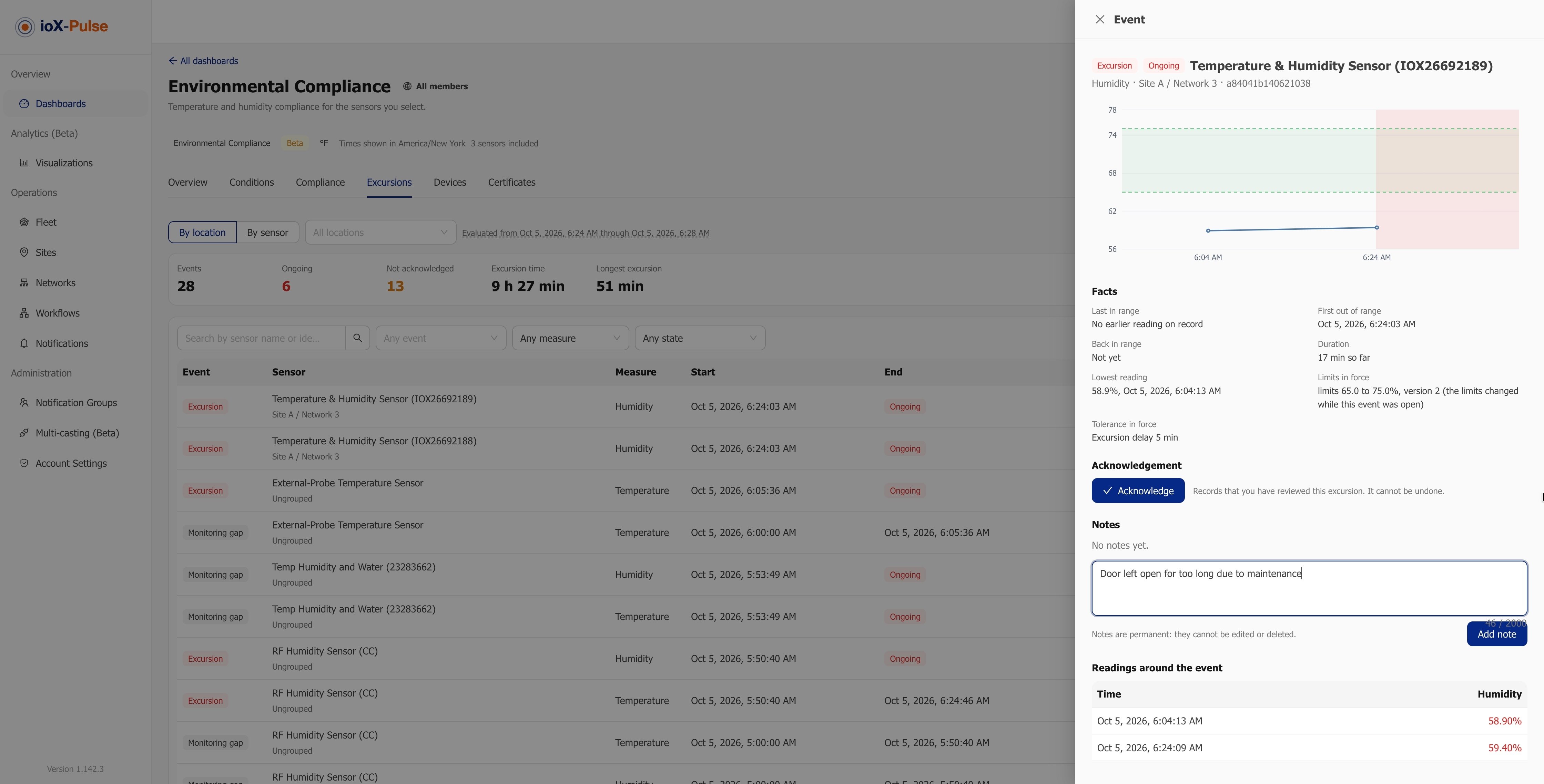
Operators and Workspace Admins acknowledge an excursion with their name and the time, and add notes that record what happened and what was done about it. Notes are permanent: they cannot be edited or deleted, only followed by another note. A faulty sensor's long run of excursions can be acknowledged together with one explanation.
The compliance report, generated for you
Generate report produces a PDF for the period on screen: the summary, the limits in force, per-sensor charts, excursions with their notes, calibration certificates, and a method section that states how every figure is calculated. You get an email when it is ready.
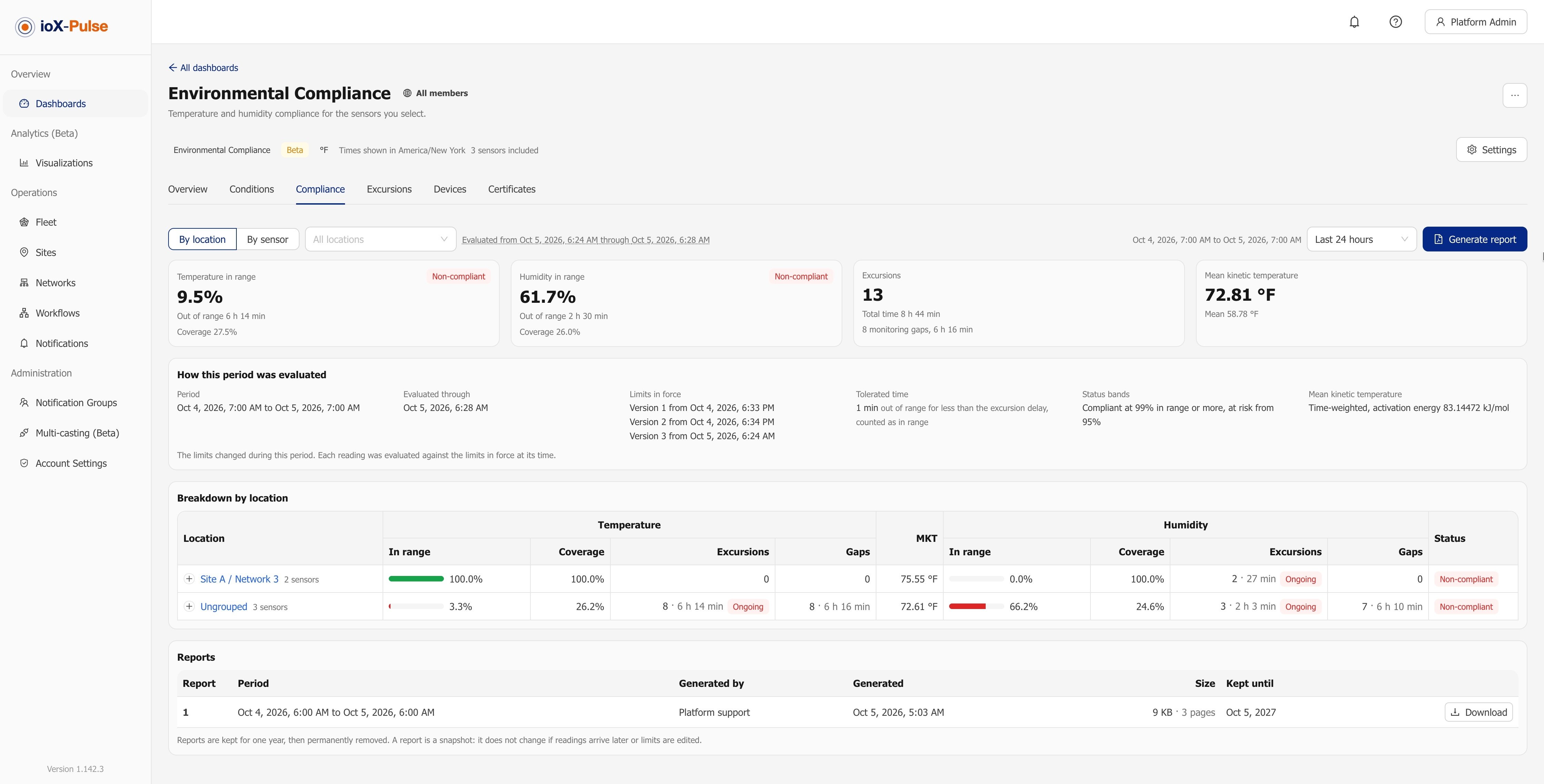
A report is a snapshot with its own number, so it does not change if readings arrive later. Report files are kept for one year; download and file any report you need for longer. With device certification tracking on your plan, the dashboard also flags readings taken without a valid calibration certificate.
One thing to know: this dashboard reports, it does not send alerts. To hear about a problem the moment it starts, pair it with an ioX-Pulse workflow that emails or texts the right people. Environmental Compliance is in beta and is a plan feature, so it may change as early users give feedback.
Sign in with Google, without giving up control
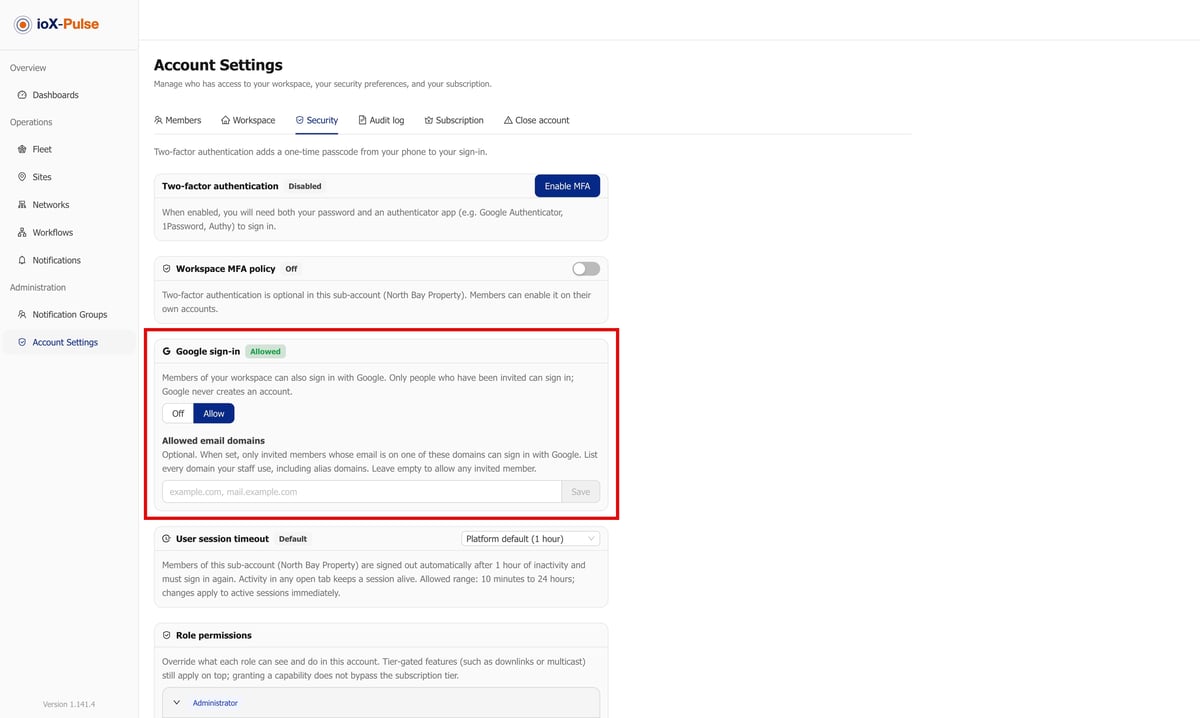
Members of a workspace that allows it can now sign in with their Google account instead of typing a password. What matters is what does not change:
- You must be invited first. Google sign-in never creates an account.
- Your password keeps working, so you are never locked out if Google is unavailable.
- If you have two-factor security turned on, you are still asked for your code.
- Google shares only your name, profile picture and email address.
Workspace Admins turn Google sign-in on per workspace, can limit it to the company's email domains, and can disconnect a member's Google account when it changes. Google sign-in policy is a plan feature. A setup page written for your Google Workspace admin covers the one Admin console setting that may need changing. The mobile app continues to sign in with email and password.
Device profiles that stay organized as your fleet grows
Profile categories let you group device profiles your own way, such as Temperature, Pressure or Relays, assign them in bulk from the list, and see the same groups in every profile picker. Every profile now also carries its connectivity: LoRaWAN, Cellular, Blues Notehub or RF. A device only accepts a profile of its own connectivity, so a mismatched profile cannot be picked by mistake.
You can also filter the list by connectivity or usage, archive unused profiles from the list, and get a warning when a new profile name is already in use.
Smaller changes worth knowing
Alerts follow site access. Members are only emailed or texted about devices and gateways they can open, so a colleague limited to one site hears only about that site.
Multi-casting is out of Beta. A multicast group sends one downlink template to every device in the group in a single action, instead of device by device.
Pro Tip: when you choose sensors for an Environmental Compliance dashboard, tick the site or the network instead of individual sensors. The dashboard then follows the group, so a replacement sensor swapped in during recalibration is included from its first reading with no edit on your side.
Why it matters: a temperature alert tells you something went wrong tonight. A compliance record shows an inspector, a customer or your own quality team what happened across the whole period and what you did about it. 1.142.6 builds that record from readings you already collect.
Frequently asked questions
What does the Environmental Compliance dashboard do?
It answers one question for the sensors you choose: did temperature and humidity stay inside their limits, and for how much of the time? You pick sensors, sites or networks and set the limits. The dashboard then reports time in range, excursions, monitoring gaps and mean kinetic temperature for any period, and generates a PDF compliance report. It is in beta and is a plan feature.
Does the Environmental Compliance dashboard send alerts?
No. The dashboard reports; it does not send alerts. To be notified when a sensor goes out of range, create a workflow for it in ioX-Pulse, which can email or text the right people.
Does Sign in with Google replace my ioX-Pulse password?
No. Google sign-in is an extra way in, not a replacement. Your password keeps working, you must be invited to the workspace first because Google sign-in never creates an account, and if you have two-factor security turned on you are still asked for your code.
Do I need new hardware to use the 1.142.6 features?
No. 1.142.6 is a platform release. The Environmental Compliance dashboard works with sensors whose device profile has a tagged temperature field, including sensors you already have connected to ioX-Pulse.
See it on your own data
ioX-Pulse is the IoT monitoring platform in the ioX-Connect suite. If you already run temperature and humidity sensors, you can see ioX-Pulse plans and start on your own readings, read more about what ioX-Pulse does, or talk to an IoT specialist about your cold rooms, labs or storage areas. The complete release history is in the changelog.
Topics from this blog: Internet of Things Regulatory Compliance ioX-Pulse environmental monitoring