The radio layer, watched properly

LoRaWAN Gateway Management

LoRaWAN gateway monitoring, gateway health, cellular LoRaWAN gateway, gateway coverage, gateway offline alert
The radio layer, watched properly

Know Your Gateways Are Up Before Your Customers Do

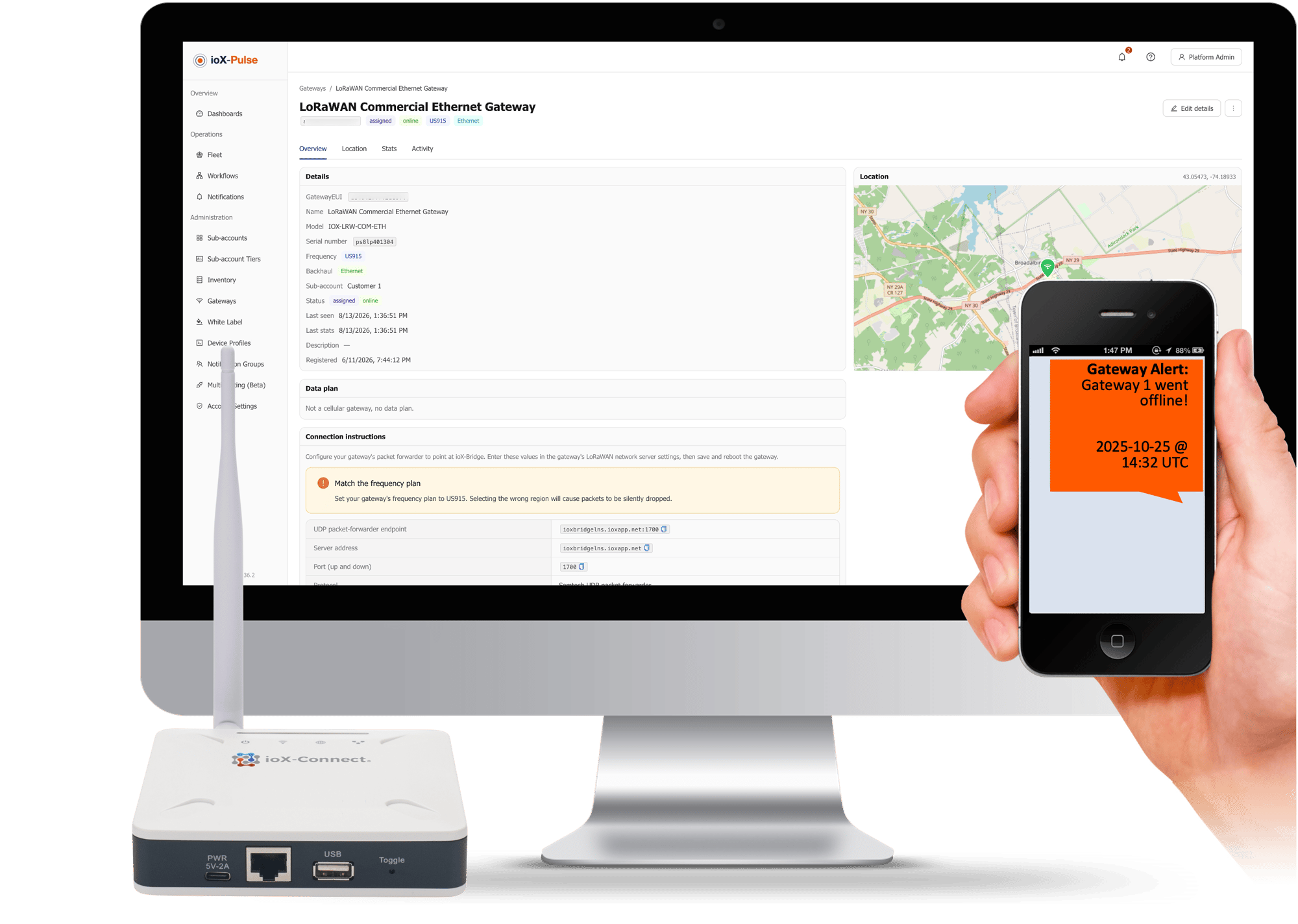
A gateway is the radio bridge between your sensors and the internet. Devices broadcast over the air, gateways pick the signal up and forward it on. When a gateway goes down it does not take one device with it, it takes a site, which is why the gateway layer is worth watching properly rather than assuming.

ioX-Pulse registers gateways, assigns them where you want them, and then keeps an eye on them: whether they are reporting, how much traffic they are carrying, and how hard the hardware is working. A gateway you have not deployed yet costs you nothing.

  • One gateway serves devices from any customer in the same region, so coverage is shared rather than duplicated
  • Traffic, processor load, memory and temperature charted over the last day, week or month
  • An offline gateway is flagged within half an hour, without anyone having to check
  • Gateways sitting in stock cost nothing until they are deployed, and retiring one frees the seat again
  • A customer can bring their own gateway online from the label, without you visiting the site
  • Network connection details can be hidden from customers entirely, so your service does not expose its plumbing

Fewer than you think

One Gateway Serves More Than One Customer

A common assumption when costing a deployment is one gateway per customer, or one per site. Usually that is wrong, and it makes the whole thing look more expensive than it is.

Coverage

A gateway carries whatever is in range

A gateway forwards uplinks for any device operating in the same region, whichever customer that device belongs to. Assigning a gateway to a customer account is about who is responsible for it and who can see it, not about what it will carry.

A business park An industrial estate A campus
Overlap

Overlap is useful rather than wasteful

When several gateways hear the same transmission the network keeps one copy and discards the rest.

A device in range of two gateways is more reliable rather than duplicated.

GATEWAY A
GATEWAY B
STORED
WHAT THAT CHANGESA handful of well-placed gateways can serve many separate customers at once.
Some of our customers

Trusted by teams monitoring critical infrastructure

Tomra Full logo
ProFrac Logo
FTSI-logo
Consulmet logo
pacific_northwest_national_laboratory
Axium Logo
Urban Property Management_Logo
NetLink-logo-final
Cosway
USWS_BIG
Filtrine
Colt Energy
Northern Michigan University_Logo
WLS Lighting Logo

Pay for what is deployed

Inventory, Assigned, Retired

Gateways follow the same rule as devices: you pay for the ones doing work.

State What it means
InventoryNO SEAT Registered to your workspace but not deployed and not yet on the network. Costs nothing, so a shipment can be logged the day it arrives.
AssignedSEAT IN USE Live, on the network, and attached to an account. This is the state that consumes a licensed seat.
RetiredSEAT FREED Decommissioned and removed from the network, which frees the seat again.

Moving between them is a decision you make rather than a support request, and the seat follows the state rather than the purchase order.

THE BILLING RULEOnly assigned gateways consume a seat. Inventory and retired cost nothing.

Bring a Gateway Online

Try It With Your Own Payload

The fastest way to know whether this works for your hardware is to run one of your own uplinks through the decoder test panel.

Bring a Gateway Online

A free trial takes a card but does not charge it. Register a gateway, point it at the network, and watch it start reporting within a couple of minutes of the reboot.

Start Your Free Trial

Before the phone call

Health, Traffic and the Condition of the Box

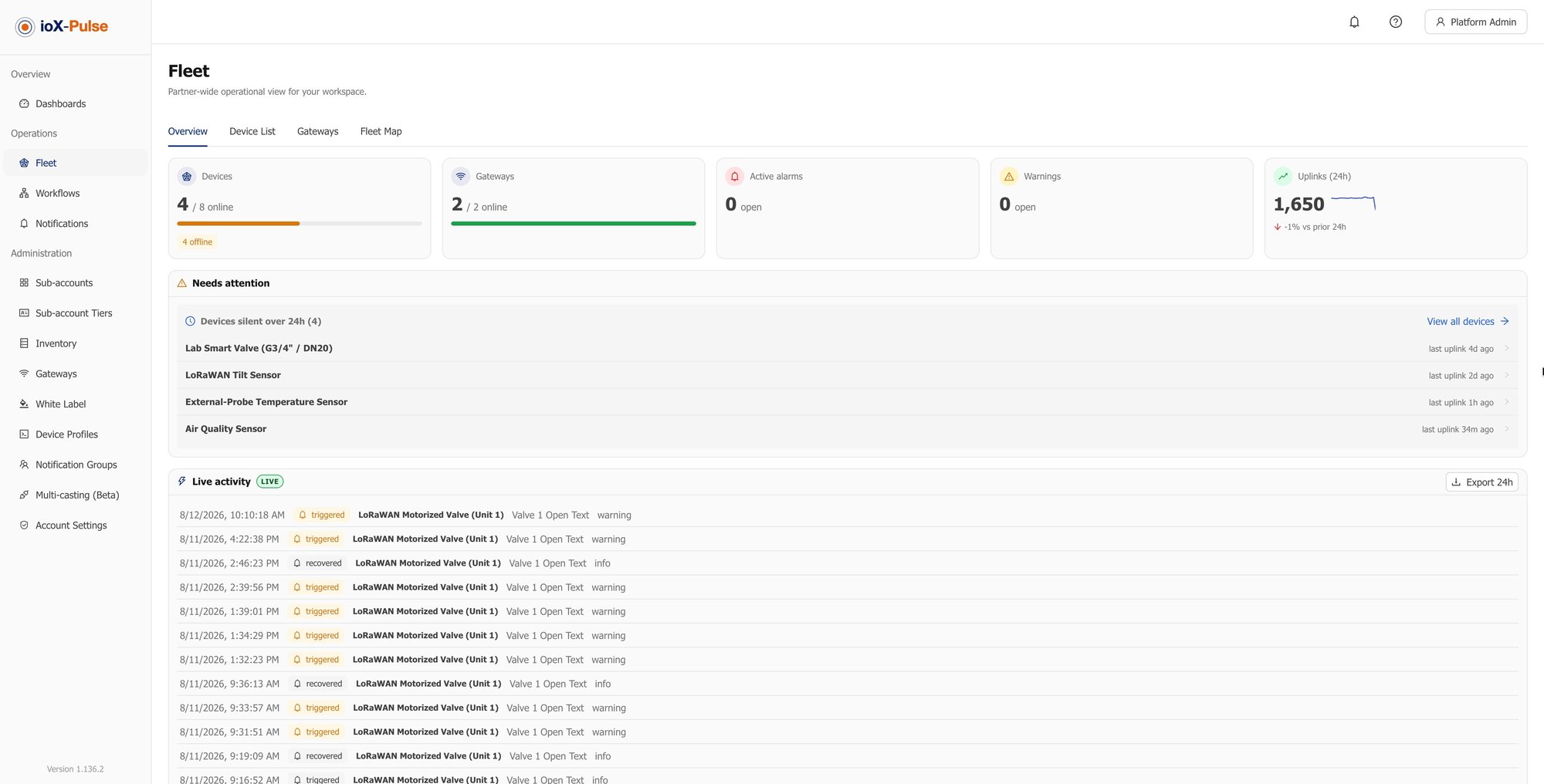
A deployed gateway reports its status every half minute or so. Miss enough of those and it is flagged offline, within about half an hour of going quiet, without anybody having to look.

STATUS REPORTED EVERY ~30 SECONDS

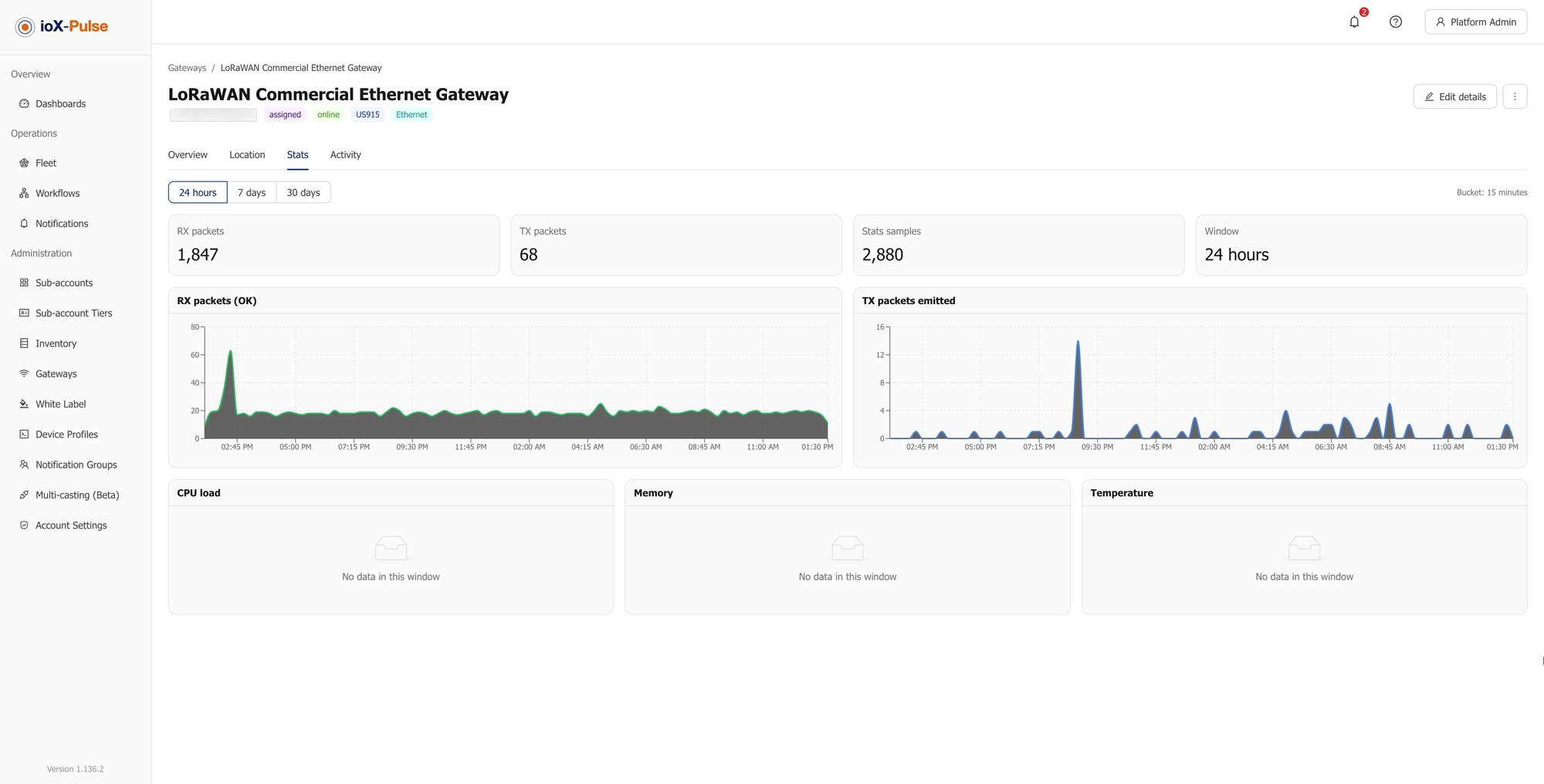
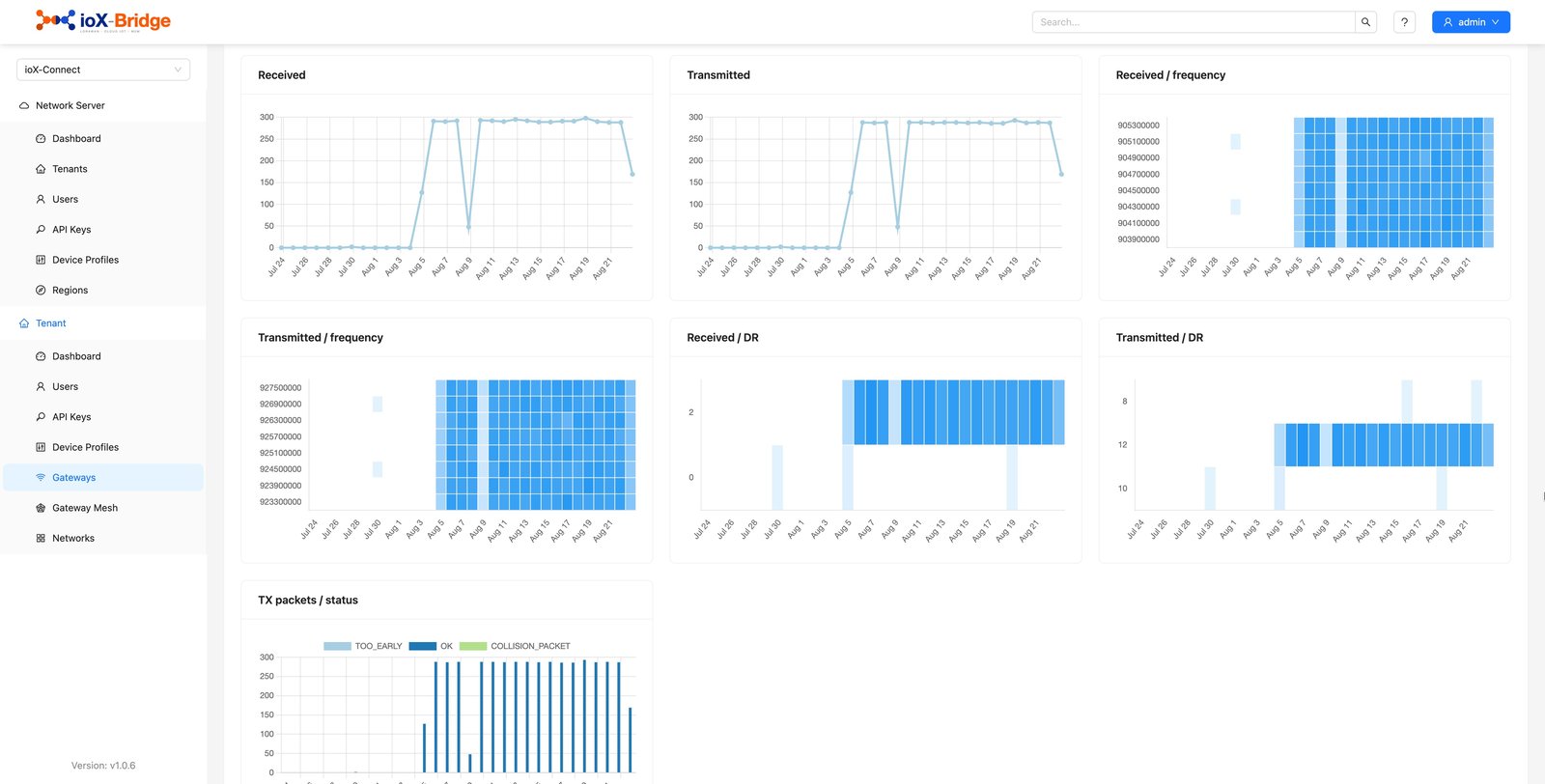
Beyond up or down, each gateway charts its own condition over the last day, week or month, which is what turns a support call into a maintenance decision.

What is charted What it tells you
Packets received and sent How much traffic the gateway is actually carrying, and whether that is changing.
Processor load Whether the gateway is working harder than it should be.
Memory use The other half of the same question.
Temperature The one that matters outdoors. A gateway running consistently hot in a cabinet in summer is telling you where the next failure will be.
The gateway stats tab, charting packets, load, memory and temperature over time.
A day, a week or a month of the gateway's own condition. Trends, not just a green dot.
THE POINTConsistently high load or temperature is a reason to go and look at a deployment before it fails, rather than after.

Your SIM or ours

Cellular Gateways and Data Plans

Where there is no usable network at a site, a cellular gateway carries its own connectivity. How that is billed depends on whose SIM is in it, and this page should be plain about which.

Situation What you pay
A cellular gateway supplied with our SIM BILLED WITH YOUR SUBSCRIPTION
The data plan is billed alongside your subscription, monthly or annually, and appears on the same bill rather than arriving separately from a carrier.
A cellular gateway on your own SIM NOTHING FROM US
Nothing from us for data. Mark it as your own SIM and it is never billed for a plan.
A gateway that is not cellular NOTHING
Nothing. There is no data plan to bill.
ALL THREE CASESTwo of them cost nothing, and saying so is worth more than any assurance about transparent pricing.

Your service, not our machinery

Keeping the Network Details Out of Sight

Bringing a gateway online means pointing it at a network server, and the connection details for doing that are shown in the app. If you would rather your customers never saw them, you can switch that panel off across your whole workspace.

The one-time details still appear to whoever registers the gateway, so setup is unaffected. What changes is that a customer looking at a gateway afterwards sees your service rather than the machinery underneath it.

  • A workspace-wide switch, not a per-gateway chore
  • The network server itself is ioX-Bridge, also part of the ioX-Connect suite, and most people running ioX-Pulse never need to touch it directly
A gateway dashboard tab as a customer sees it.
What a customer sees afterwards. The gateway, not the connection details behind it.
WHY IT IS THERESetup still works. The plumbing just stops being part of your customer's view.

The honest version

A Gateway You Can See Against One You Cannot

Plenty of deployments treat gateways as install-and-forget. Here is the same work, done both ways.

The job Install and forget With ioX-Pulse
Knowing a gateway is down A customer tells you their data stopped Flagged within about half an hour of it going quiet
Working out why a site is unreliable A site visit Traffic, load and temperature charted for the last month
Costing coverage for a new customer Assume one gateway each Check what your existing gateways already reach
Getting a gateway online at a customer site A visit, or a long phone call They enter two numbers from the label
Hardware waiting in the store room Licensed from the day it was bought Free until it is deployed
Cellular data billing A separate carrier invoice to reconcile On the same bill, or nothing at all if the SIM is yours
THE DIFFERENCEInstall-and-forget means your customer finds the fault first.
Answers to the questions we get most

Common Questions About LoRaWAN Gateways

If your question is not here, email sales@iox-connect.com and you will get a straight answer

Usually not. A gateway forwards uplinks for any device in the same region, whichever account that device belongs to, so a small number of well-placed gateways can serve many customers. Assigning a gateway to an account decides who is responsible for it and who can see it, not what it will carry.

The network keeps one copy of the message and discards the duplicates, so overlapping coverage makes a device more reliable rather than producing double readings. Overlap is worth having wherever you can get it.


A healthy gateway reports its status every half minute, and one that has been silent for around half an hour is flagged offline automatically. You do not have to be watching for it.


Yes, if you allow it. Mark the gateway as claimable and whoever holds it can bring it online by entering the identifier and serial from its label. It then provisions on the network and attaches to their account. Cellular gateways are excluded, because the data plan billed to you would travel with the hardware.


Only if you want them to. The connection details are needed once, when a gateway is set up, and you can hide that panel across your workspace so customers looking at a gateway afterwards see your service rather than the network underneath it.


Yes. Alongside the data endpoints there is one to validate a member sign-in, so your application can authenticate people against ioX-Pulse rather than running a separate identity system. If you only want your own branding on the existing interface, that is a settings page rather than a build.


A gateway that has not been deployed costs nothing, and retiring one releases its seat. If it is cellular and carries our SIM, its data plan is billed alongside your subscription; if it is on your own SIM, or it is not cellular, there is no data charge from us at all.

Coverage sorted this week

Ready to Get Your Gateways Under Watch?

Start a free trial and bring one gateway online, or tell us where your sites are and we will help you work out how many you actually need.

LoRaWAN Device Management | ioX-Pulse

LoRaWAN Device Management

IoT Alerts and Workflows | ioX-Pulse | ioX-Connect

IoT Alerts and Workflows

Multi-Tenant IoT Platform | ioX-Pulse | ioX-Connect

Multi-Tenant IoT Platform