Bytes in, named readings out

LoRaWAN Device Profiles and Payload Decoders

LoRaWAN Payload Decoders & Device Profiles | ioX-Pulse
Bytes in, named readings out

Device Profiles and Payload Decoders

A LoRaWAN device sends raw bytes, and without context those bytes mean nothing. A device profile supplies the context: a decoder that turns bytes into named values, the field definitions those values populate, and the display defaults that decide what shows on a dashboard. Every device in ioX-Pulse references exactly one profile.

Define it once per device model and every unit of that model inherits it. That is what makes bringing your own hardware a configuration job rather than an integration project, and it is why a sensor from a manufacturer we have never met can be reporting named, charted, alertable readings the same afternoon you unbox it.

  • A JavaScript decoder written to the standard codec shape, run server-side on every uplink
  • A test panel that runs your decoder against a pasted hex payload before any device depends on it
  • Fields with types, units and rollup behavior, so charts and gauges know what they are looking at
  • Formula fields for values the device never sends, computed from the ones it does
  • Named downlink commands defined once and available on every device using the profile
  • A manufacturer library to start from, so most devices need no JavaScript at all

Three things in one place

What a Device Profile Contains

A profile is the definition of a device model, and it holds three separate things that are easy to confuse.

RAW UPLINK
01 0A 2C 03 64
1F 00 B4
DECODED FIELDS
temperature26.0 °C
humidity52 %
battery3.1 V
WHAT A PERSON SEES
26.0°C
temperature is primary · humidity secondary
1

The decoder

A function that receives the raw payload and returns named values. It runs on the server on every uplink, so nothing depends on the device or the network doing anything clever.

2

The fields

The named values themselves, each with a type, a unit, and a declared behavior over time. Fields are what rules, charts and dashboards bind to.

3

The display defaults

Which field is primary and which is secondary, so a device list or a widget shows the reading that matters without being configured device by device.

A profile can also carry named downlink commands and a dashboard layout, both covered further down.

Devices reference the profile rather than copying it, so editing the profile changes every device using it.

Some of our customers

Trusted by teams monitoring critical infrastructure

Tomra Full logo
ProFrac Logo
FTSI-logo
Consulmet logo
pacific_northwest_national_laboratory
Axium Logo
Urban Property Management_Logo
NetLink-logo-final
Cosway
USWS_BIG
Filtrine
Colt Energy
Northern Michigan University_Logo
WLS Lighting Logo

One function, run on every uplink

Writing the Decoder

The decoder is a single JavaScript function written to the standard LoRaWAN codec shape, the same one manufacturers publish alongside their hardware. If your vendor supplies a decoder, it will usually run here with no changes at all.

decoder.js STANDARD LORAWAN CODEC SHAPE
function decodeUplink(input) {
  // input.bytes    -> number[] of payload bytes
  // input.fPort    -> the LoRaWAN port the device used
  // input.recvTime -> a Date object, when the message arrived

  return {
    data: {
      temperature: input.bytes[0] - 40,
      battery_percent: input.bytes[1],
    },
    warnings: [],  // optional, surfaced in the device's Events tab
    errors: [],    // optional, marks the uplink as decode-failed
  };
}

Keys must match your fields

The keys you return under data must match the identifiers of your fields. Anything else you return is ignored.

Extras still show in the test panel

Ignored keys are still visible while testing, which is useful when you are working out a payload format from a datasheet.
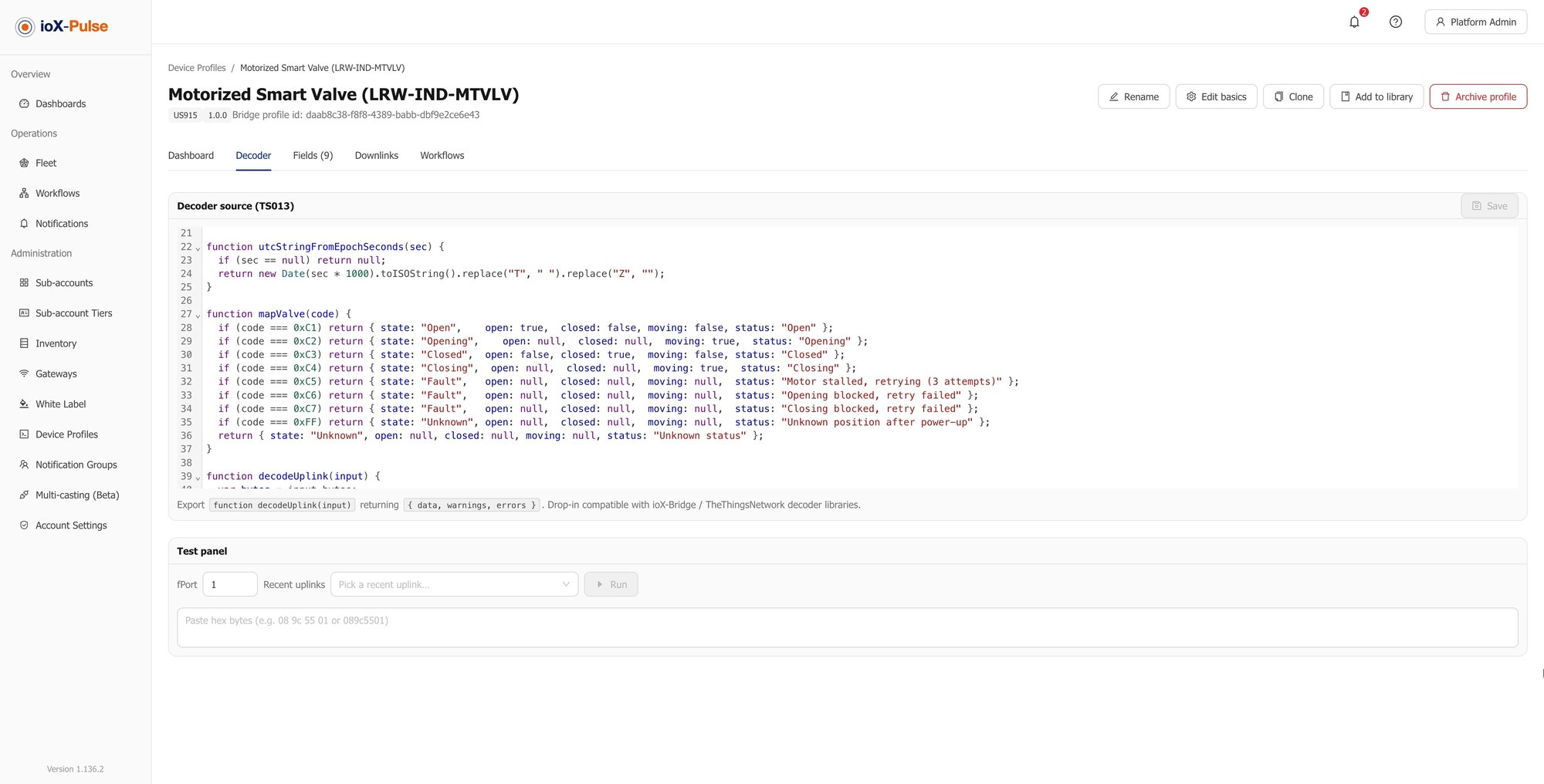
The custom decoder editor with the test panel, showing a hex payload decoded into named values.
Editor and test panel on one screen. Paste, run, read the output.

Before a single device depends on it, test it against a real payload:

  • 1
    Paste a hex payload and the port into the test panel.
  • 2
    Run it.
  • 3
    Read the decoded object and any warnings or errors it produced.
WHY IT MATTERSThat loop is the difference between debugging a decoder at a desk and debugging it in a field with a laptop on the roof of a van.

Four types, three behaviors

Fields: What Your Devices Produce

A field is a named value with a type. The type decides what can be stored and how it is validated; a second setting decides how the value behaves over time, which is what lets a chart roll it up correctly without you thinking about it.

Number

Optional unit and decimal places, plus min and max — used for validation and to scale gauge widgets correctly.

26.0 °C
String

Text values.

"door_open"
Boolean

True or false states.

true
Date

A calendar date such as an install or service date. Always set manually rather than decoded, and usable in formulas as whole days.

2026-03-14

How the value accumulates

For Number fields you also declare how the value accumulates, which decides what a chart does with it.

Gauge RIGHT FOR ALMOST EVERY SENSOR

A current reading. Charts average it within each bucket.

Counter

A value that only increases, such as total flow or lifetime distance. Charts difference it across buckets to show the change rather than the total.

Absolute

A value that is replaced rather than accumulated.
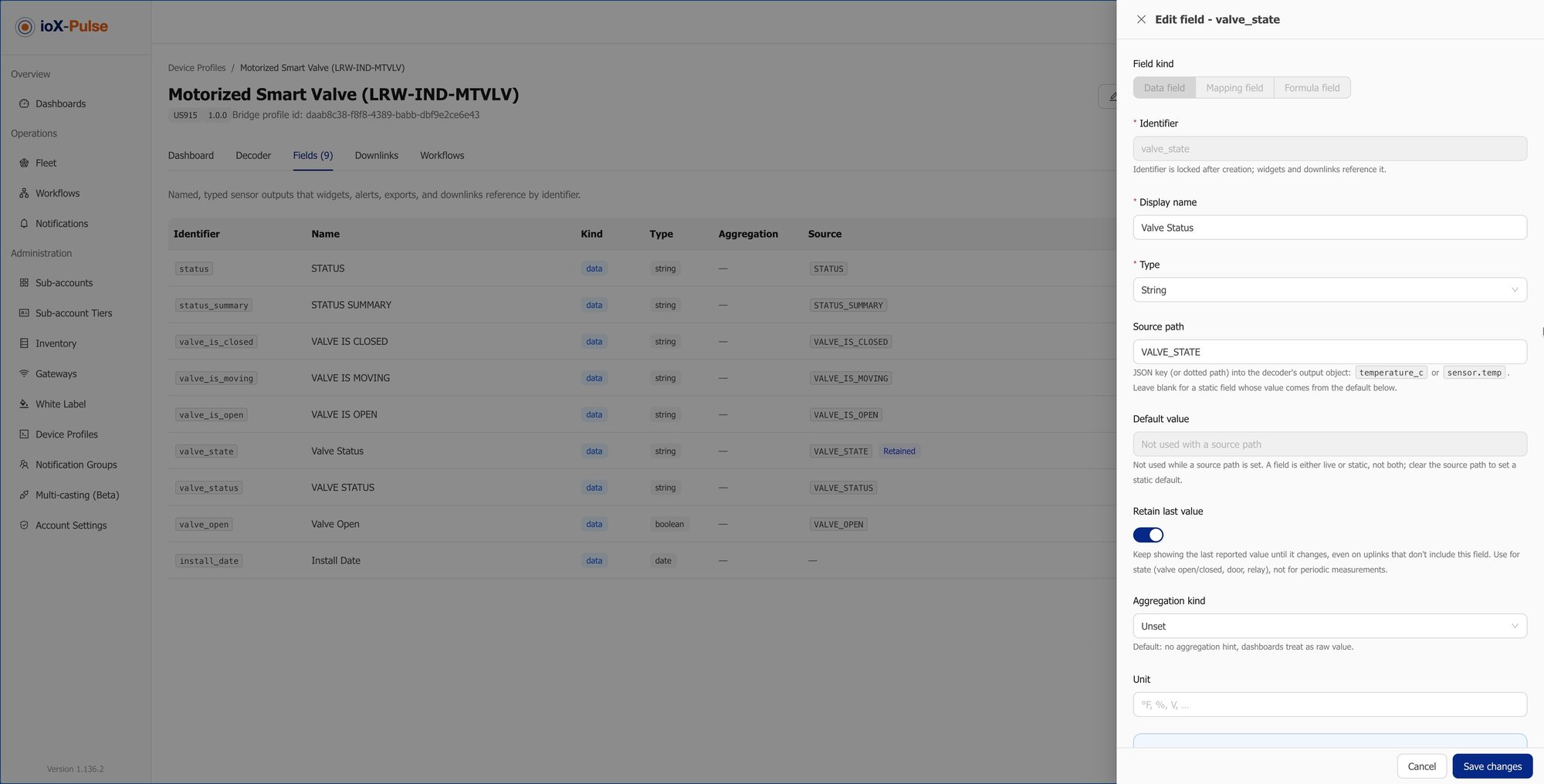
The fields editor, showing each field with its type, unit and accumulation behavior.
Type, unit and behavior are declared once per field. Every chart and rule that binds to it inherits the answer.
WHY WE ASK UP FRONTA counter charted as a gauge is one of the most common ways an IoT deployment ends up with graphs nobody trusts.

From a distance reading to a fill level

A Worked Example: Tank Depth to Percent Full

An ultrasonic sensor in the lid of a tank does not report how full the tank is. It reports how far away the liquid is. Turning one into the other needs a number the device does not know and cannot send: how far the sensor sits above the bottom.

distance_mm mount_height_mm fill_percent
What the device reports
What you tell the profile
What a person reads
  1. 1

    The decoder produces distance_mm

    Straight from the payload — the gap between the sensor and the surface of the liquid.

  2. 2

    Add a static field, mount_height_mm

    A static field has a default value and no source path, so it is part of the profile rather than something the device reports. Set the default to the mounting height you use most; any individual tank that differs can override it on its own device.

  3. 3

    Add a formula field, fill_percent

    Computed from the two:

    fill_percent
    round(max(0, min(100,
      ((mount_height_mm - distance_mm) / mount_height_mm) * 100
    )))
  4. 4

    Set fill_percent as the primary display field

    So every tank on this profile shows a percentage in the device list and on its dashboard rather than a distance in millimeters.
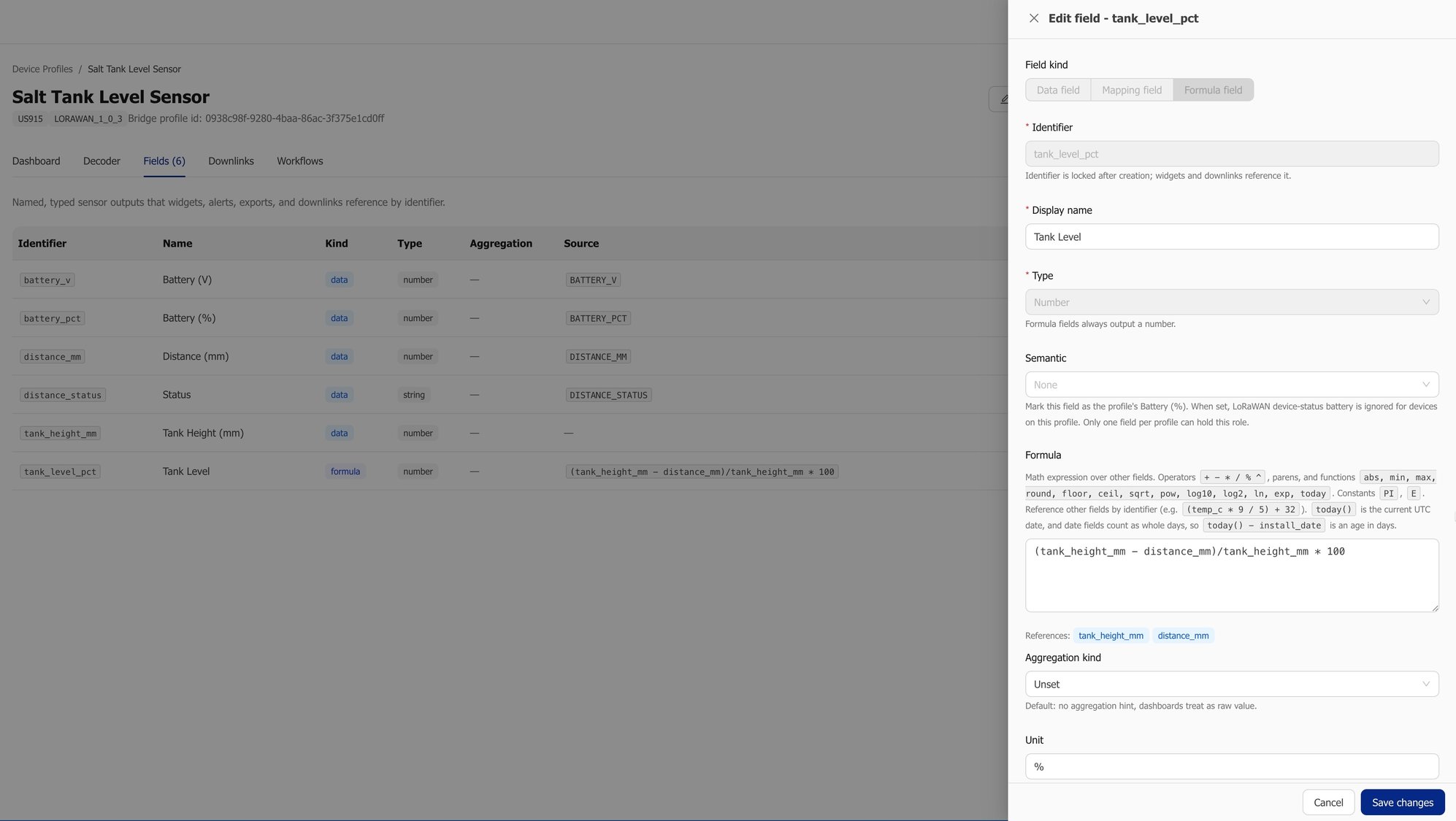
The formula field editor, showing fill_percent computed from mount_height_mm and distance_mm.
The formula lives in the profile, not in a device. Written once, applied to every tank on it.

Nothing about that is per device

Register the next two hundred tanks against the same profile and they arrive knowing what to compute, what to call it, and what to show. The only per-device step is the handful whose sensor sits at a different height.

Why the min and max are there

A sensor reading a splash, or an empty tank, can produce a distance outside the expected range. Without clamping you get a fill level above 100 or below zero on a customer's dashboard.

Formula fields support abs, min, max, round, floor, ceil, sqrt and pow, along with the usual arithmetic operators.

Bring a payload you already have

Try It With Your Own Payload

The fastest way to know whether this works for your hardware is to run one of your own uplinks through the decoder test panel.

Try It With Your Own Payload

A free trial takes a card but does not charge it. Paste a real hex payload from your own sensor into the decoder test panel and see it resolve into named fields before you commit to anything.

Start Your Free Trial

Not every value arrives every time

Values That Do Not Arrive on Every Uplink

Plenty of devices report a state only when it changes. A valve sends open, then says nothing for a week. Handled naively, a dashboard looking at the last hour shows no data, and an operator concludes the device is dead.

WITHOUT RETAIN LAST VALUE
— —
valve state · last hour
Operator reads: the device is dead
WITH RETAIN LAST VALUE
OPEN
valve state · last reported 6 days ago
Operator reads: the valve is open

Retain last value

Turn it on for the field and it keeps showing the last reported state rather than emptying out when the last change scrolls out of the window.

A declared battery source

Mark one field as the profile's battery source and battery level is understood as such across the platform, rather than being just another number that happens to be called battery.

Commands that write back

A downlink command can write its own result into a field when the device acknowledges it, so the state you commanded and the state you display cannot drift apart.

WHY IT MATTERSA blank widget and a device that is genuinely offline look identical to an operator — these three settings stop them being confused.

Per device, not per profile

Correcting a Sensor That Reads High

Real sensors drift. That is a property of the individual unit, not of the model — which is why correction sits on the device rather than on the profile.

+0.5 °C

A thermometer reads half a degree high against a reference.

−2 %

A flow meter under-reports by two percent.

AGED

A humidity probe has aged past its accuracy window.

The profileDESCRIBES THE MODEL

The decoder, the fields, the units and the display defaults — everything true of every unit of that model.

  • Edit it once, every device follows
  • Nothing here is unit-specific
The deviceCARRIES ITS OWN CORRECTION

Calibration is a scale and an offset on one field of one device — because the drift belongs to that unit.

  • No change to the decoder, the profile, or the device itself
  • The other four hundred devices on that profile are untouched

A scale and an offset, on one field

DEVICE REPORTS
21.9°C
raw uplink
CALIBRATION ON THIS DEVICE
× 1.00
offset −0.5
EVERYONE SEES
21.4°C
matches the reference

The value everyone sees matches reality without touching the decoder, the profile, or the device itself. Correcting one thermometer does not change the other four hundred devices that share its profile.
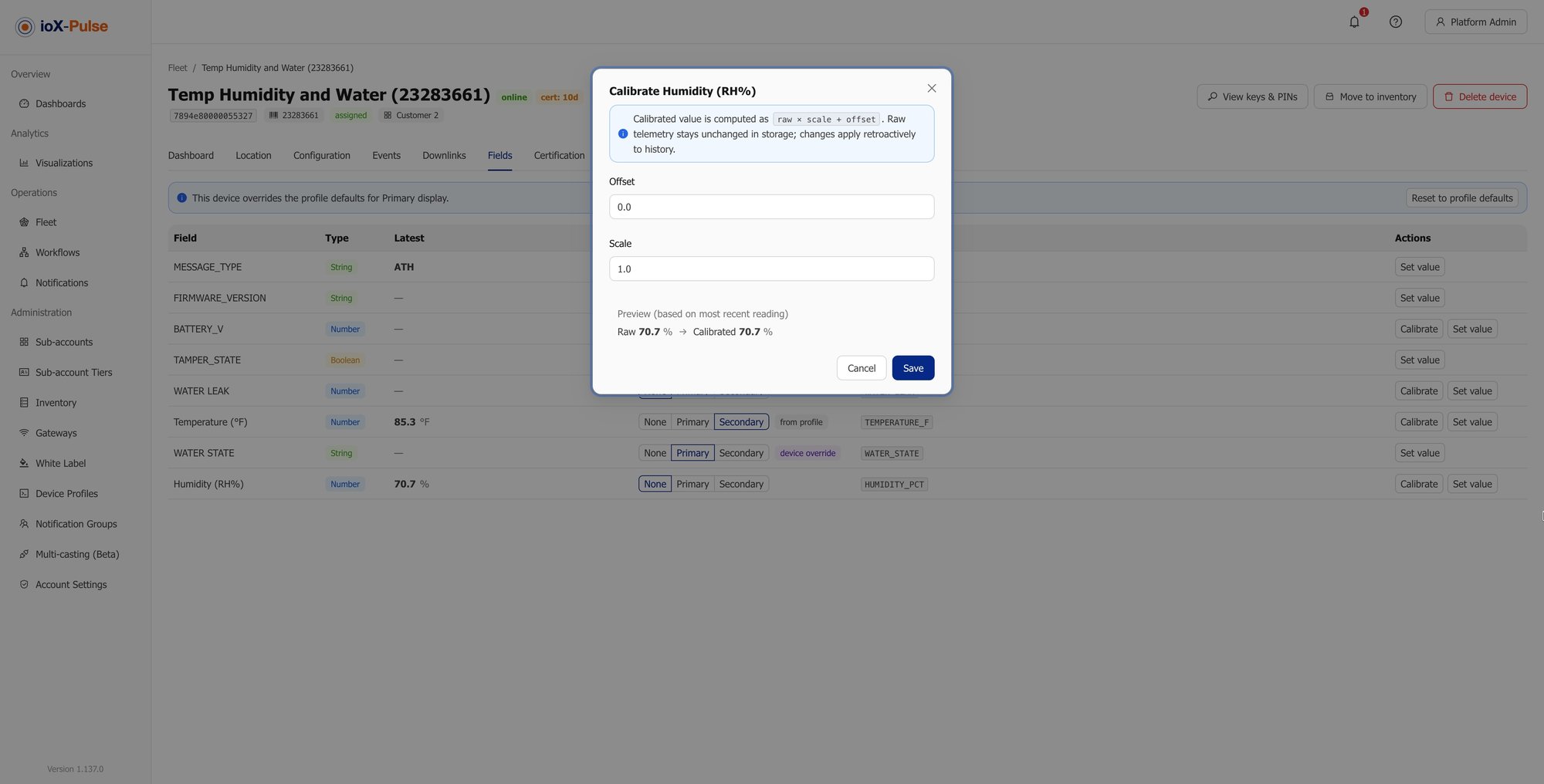
Field calibration on a single device, setting a scale and an offset for one field.
Calibration is set on the device, one field at a time. The profile it belongs to is not modified.
THE DISTINCTIONProfile-level correction fixes a model. Device-level calibration fixes a unit. They are deliberately not the same setting.

The other direction

Sending Commands Back to the Device

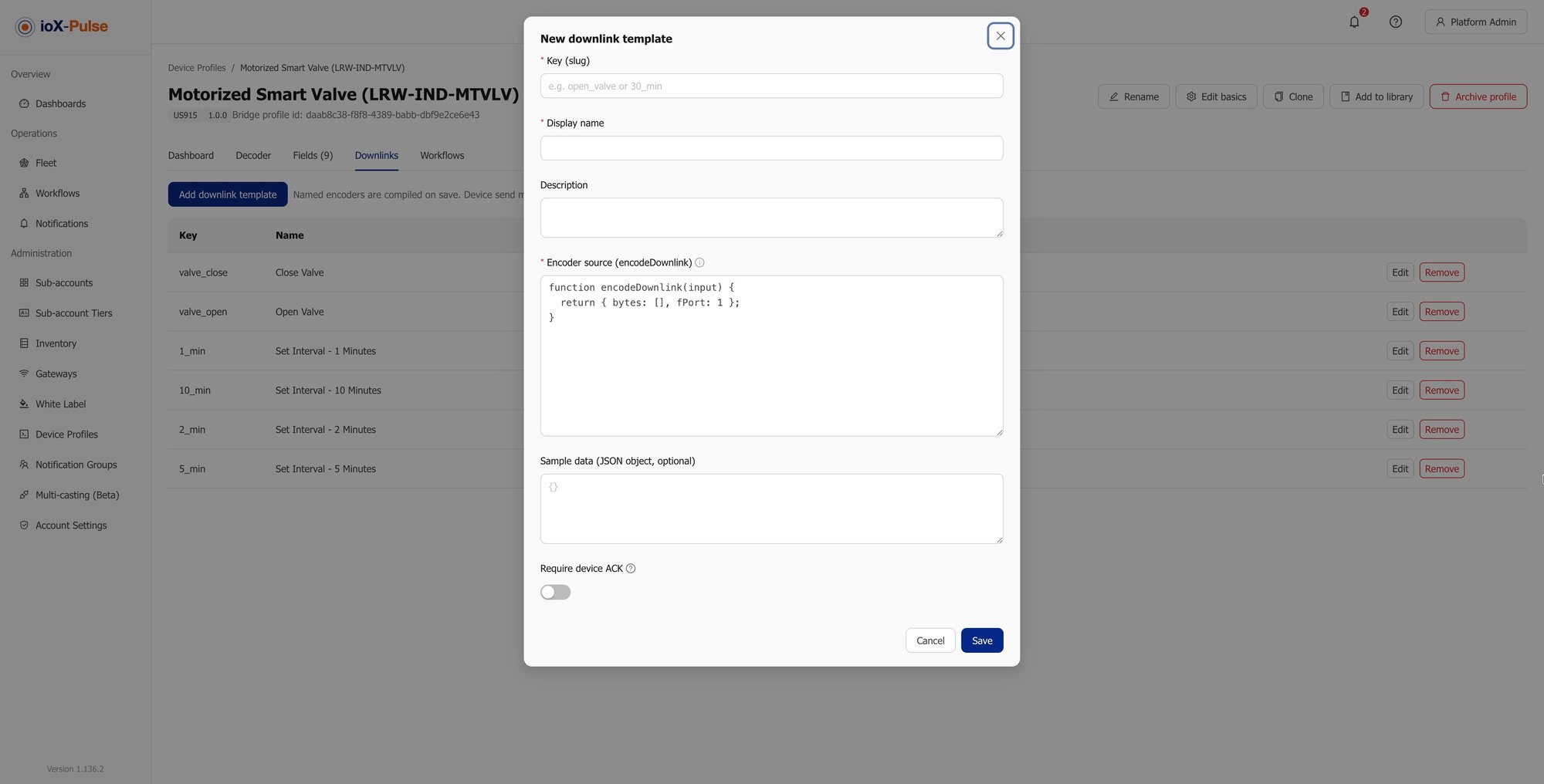
A decoder turns bytes from the device into fields. A downlink goes the other way: a command sent to the device. Define it once on the profile as a named template and it is available on every device using that profile.

Uplink — the decoder

Bytes from the device become named fields.

Downlink — the encoder

An operator's inputs become the bytes the device expects.

Open a valve Change a reporting interval Move a threshold

What a command template holds

Five parts, defined once on the profile.

A stable key

Identifies the command and cannot be changed after creation, so anything referencing it keeps working. Choose it deliberately.

A display name

What an operator sees when picking a command, rather than the key.

An encoder

A function that turns the inputs an operator supplies into the bytes the device expects.

Require device ACK CONFIRMED FRAME

Sends the command as a confirmed frame, so the device has to acknowledge it on its next uplink rather than the command being assumed delivered.

On ACK, set field NO DRIFT

Writes a value into a field once the device confirms. The displayed state follows what the device actually did, not what was requested.
OPERATOR SENDS
Open valve
confirmed frame
DEVICE ACKNOWLEDGES
ACK on next uplink
not assumed delivered
FIELD UPDATES
valve_state = open
what the device did
The downlink command templates on a device profile, each with a key, display name and encoder.
Commands are defined on the profile, not per device. Every device on it gets the same named set.
THE POINT OF THE LAST TWOWithout an acknowledgement, "commanded" and "actually happened" are two different things that look identical on a dashboard.

Start from something tested

The Manufacturer Profile Library

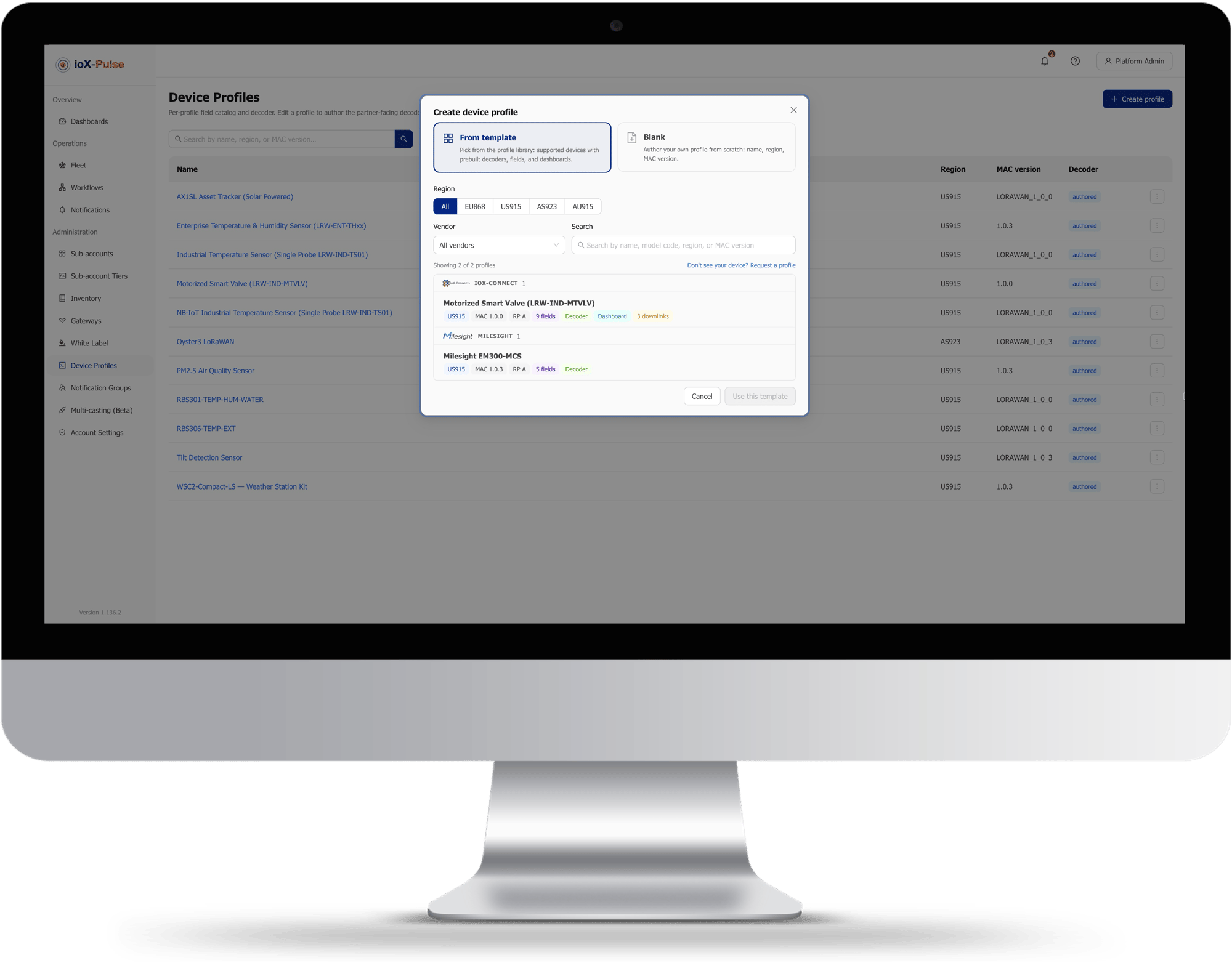
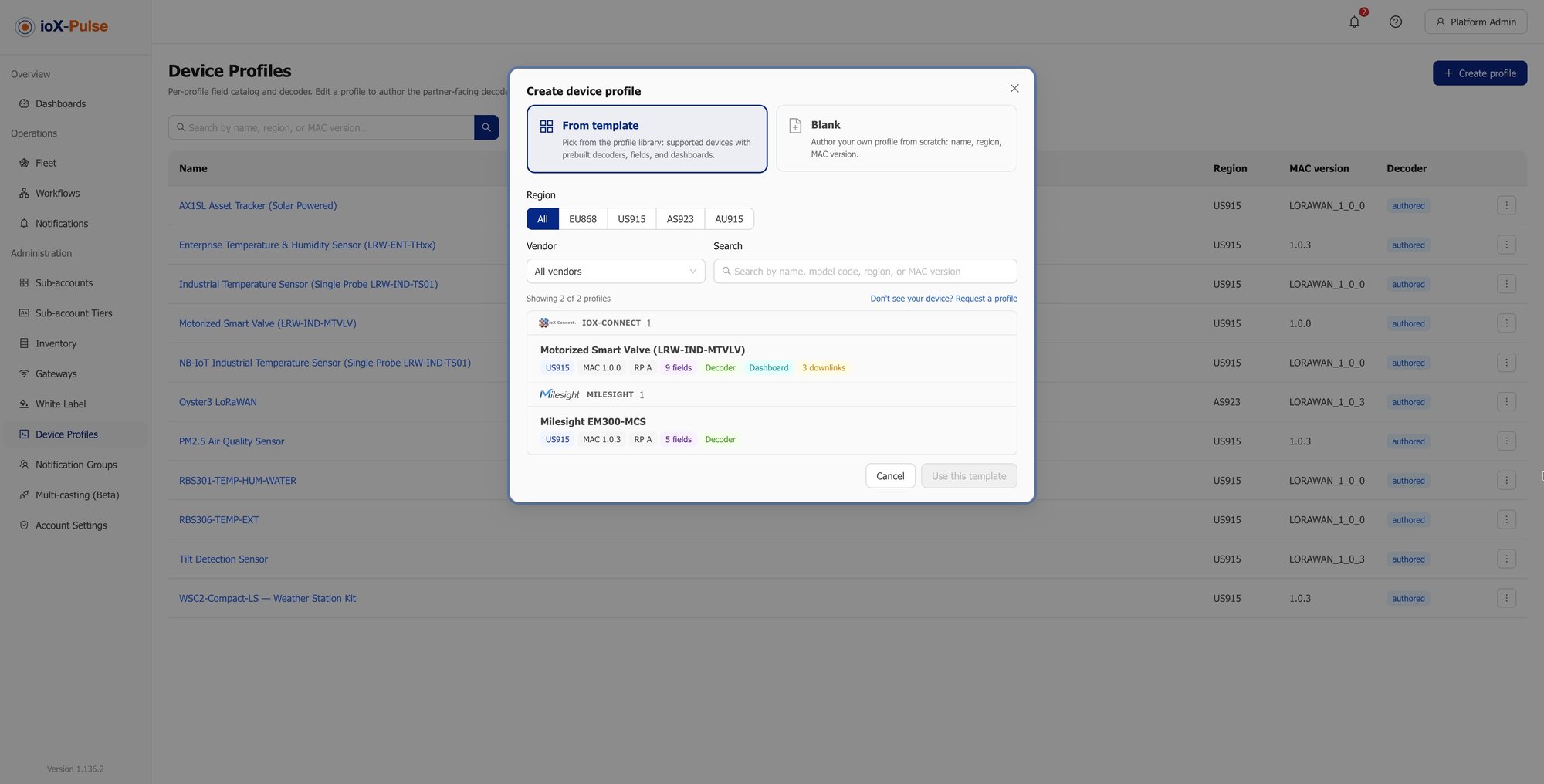
Most devices need no JavaScript at all. The library covers common sensors from major manufacturers, and starting from an entry gives you a working profile without writing a line of code.

Filter by region, by manufacturer, or by searching across device name, manufacturer, firmware and LoRaWAN version. Each entry shows what it includes, which depending on the device can be the decoder, the field set, named downlink commands and a prebuilt dashboard.

Region Manufacturer Device name Firmware LoRaWAN version

Pick one, name your copy, and you have a profile you own and can edit.
Temperature & Humidity SensorMANUFACTURER · EU868 · LORAWAN 1.0.3
Decoder · tested against the datasheet
Field set · types, units, behavior
Named downlink commands
Prebuilt dashboard
Use this profile Creates your own editable copy
Adding a device profile from the manufacturer library, with filters and each entry's contents listed.
Filter, read what an entry includes, take a copy. No code needed for a device the library already covers.

Your copy is yours

Editing it never reaches back into the library.

No silent changes

The library updating never silently changes a profile your devices depend on.

Need a variant? Clone

If you already have a profile that works, clone that instead and start from something you have already proven in the field.
WHY A COPY, NOT A LINKNothing upstream can change what your deployed devices are decoding — that is the whole reason the library hands you a copy.

The honest version

Writing Decoders Yourself Against Starting From the Library

Plenty of teams already decode payloads somewhere — in a Lambda, a middleware layer, or a script somebody wrote and left. Here is the same work, done both ways.

The job Your own decoding layer With device profiles
A new sensor model Read the datasheet, write it, deploy it Start from a library entry, or paste the vendor's decoder in
Testing before it goes live A test harness you built and maintain Paste a hex payload into the panel and run it
A value the device does not send Compute it downstream, in another system A formula field on the profile
Charting a counter correctly Remember which values are counters, everywhere Declare it once on the field
A sensor that reads high A special case in your code, forever Calibrate that one device
Sending a command A second integration, in the other direction A named template on the same profile
Adding four hundred of the same device Nothing, if it already works Nothing, because they reference the profileA DRAW
A new sensor model
YOUR OWN DECODING LAYERRead the datasheet, write it, deploy it
WITH DEVICE PROFILESStart from a library entry, or paste the vendor's decoder in
Testing before it goes live
YOUR OWN DECODING LAYERA test harness you built and maintain
WITH DEVICE PROFILESPaste a hex payload into the panel and run it
A value the device does not send
YOUR OWN DECODING LAYERCompute it downstream, in another system
WITH DEVICE PROFILESA formula field on the profile
Charting a counter correctly
YOUR OWN DECODING LAYERRemember which values are counters, everywhere
WITH DEVICE PROFILESDeclare it once on the field
A sensor that reads high
YOUR OWN DECODING LAYERA special case in your code, forever
WITH DEVICE PROFILESCalibrate that one device
Sending a command
YOUR OWN DECODING LAYERA second integration, in the other direction
WITH DEVICE PROFILESA named template on the same profile
Adding four hundred of the same device
YOUR OWN DECODING LAYERNothing, if it already works
WITH DEVICE PROFILESNothing, because they reference the profile — a draw
Answers to the questions we get most

Common Questions About LoRaWAN Payload Decoders

If your question is not here, email sales@iox-connect.com and you will get a straight answer

It is a small function that turns the raw bytes a LoRaWAN device transmits into named values such as temperature or battery level. In ioX-Pulse the decoder is JavaScript written to the standard codec shape, it lives on the device profile, and it runs on the server on every uplink, so the device and the network do not need to know anything about it.

A device profile is the definition of a device model: the decoder, the fields those decoded values populate, the display defaults, and optionally named downlink commands and a dashboard layout. Every device references exactly one profile, and editing the profile changes every device using it.


Usually yes, unchanged. Manufacturer decoders are written to the same standard codec shape, so they generally run as they are. Paste it in and test it against a real payload before assigning devices to the profile.


Yes, and that is the point of this page. Any LoRaWAN device can be described by a profile. Start from the manufacturer library if your device is in it, paste the vendor's decoder if it is not, or write your own against the signature above.


With a formula field, computed from other fields on the profile, including static ones that describe the installation rather than the reading. A depth sensor plus a mounting height gives you a fill percentage; the device never has to know how tall the tank is.


Values you return that do not match a field identifier are ignored, and you can return warnings or errors explicitly. Warnings appear in the device's Events tab, and errors mark the uplink as failed to decode, so a bad payload is visible rather than silently producing a wrong reading.


Your sensor, decoded this week

Ready to Bring Your Own Hardware?

Start a free trial and decode a real payload from your own device, or send us the model and the datasheet and we will tell you whether it is already in the library.

Multi-Tenant IoT Platform | ioX-Pulse | ioX-Connect

LoRaWAN Device Management

global-dashboard-widget-list

IoT Dashboards and Widgets

Multi-Tenant IoT Platform | ioX-Pulse | ioX-Connect

Multi-Tenant IoT Platform